This Blog is discontinued, its only read-only

Showing posts with label Linux. Show all posts

Monday, August 24, 2020

Oracle Forms & Reports 12.2.1.4.0 on Oracle Linux 8 / Redhat 8

Oracle Forms & Reports 12.2.1.4.0 is officially supported and certified with Oracle Linux 8 and Redhat 8. But in case you want to install the Oracle Forms & Reports 12.2.1.4.0 you will see that you are running into an error while performing the prerequirement check.


#
Starting check : CertifiedVersions
Expected result: One of oracle-7, redhat-7, redhat-6, oracle-6, SuSE-11, SuSE-12, SuSE-15
Actual Result: redhat-8.2
Check complete. The overall result of this check is: Passed
CertifiedVersions Check: Success.

Starting check : Packages
Checking for binutils-2.23.52.0.1; found binutils-2.30-73.el8-x86_64.	Passed
Checking for compat-libcap1-1.10; Not found.	Failed
Checking for compat-libstdc++-33-3.2.3-x86_64; Not found.	Failed
Checking for libgcc-4.8.2-x86_64; found libgcc-8.3.1-5.el8-x86_64.	Passed
Checking for libstdc++-4.8.2-x86_64; found libstdc++-8.3.1-5.el8-x86_64.	Passed
Checking for libstdc++-devel-4.8.2-x86_64; found libstdc++-devel-8.3.1-5.el8-x86_64.	Passed
Checking for sysstat-10.1.5; found sysstat-11.7.3-2.el8-x86_64.	Passed
Checking for gcc-4.8.2; found gcc-8.3.1-5.el8-x86_64.	Passed
Checking for gcc-c++-4.8.2; found gcc-c++-8.3.1-5.el8-x86_64.	Passed
Checking for ksh-...; found ksh-20120801-254.el8-x86_64.	Passed
Checking for make-3.82; found make-1:4.2.1-10.el8-x86_64.	Passed
Checking for glibc-2.17-x86_64; found glibc-2.28-101.el8-x86_64.	Passed
Checking for glibc-devel-2.17-x86_64; found glibc-devel-2.28-101.el8-x86_64.	Passed
Checking for libaio-0.3.109-x86_64; found libaio-0.3.112-1.el8-x86_64.	Passed
Checking for libaio-devel-0.3.109-x86_64; found libaio-devel-0.3.112-1.el8-x86_64.	Passed
Checking for motif-2.3.4; found motif-2.3.4-16.el8-x86_64.	Passed
Check complete. The overall result of this check is: Failed

As you can see from above, the Oracle Installer is failing because of the missing packages compat-libcap1-1.10 and compat-libstdc++-33-3.2.3-x86_64.
These 2 packages can not be found in the Oracle Linux 8 and Redhat 8 distrubition, they have been removed since Release 8.

To resolve this problem, you will need to download the Patch 31190532 from My Oracle Support, transfer the patch to your target server, extract the patch somewhere and modify your Oracle Installer startup command as follows:

#
./fmw_12.2.1.4.0_fr_linux64.bin -prereqConfigLoc <Path_to_the_patch>/31190532/prereq_metadata/oracle.as.install.fr.prerequisite/prereq

and now the Oracle Installer will successfully pass the prerequirement checks:

#
Starting check : CertifiedVersions
Expected result: One of oracle-8, oracle-7, redhat-8, redhat-7, redhat-6, oracle-6, SuSE-11, SuSE-12, SuSE-15
Actual Result: redhat-8.2
Check complete. The overall result of this check is: Passed
CertifiedVersions Check: Success.

Starting check : Packages
Checking for binutils-2.23.52.0.1; found binutils-2.30-73.el8-x86_64.	Passed
Checking for libcap-2.25-9; found libcap-2.26-3.el8-x86_64.	Passed
Checking for libstdc++-8.2.1-3.5.0.1.el8-x86_64; found libstdc++-8.3.1-5.el8-x86_64.	Passed
Checking for libgcc-4.8.2-x86_64; found libgcc-8.3.1-5.el8-x86_64.	Passed
Checking for libstdc++-devel-4.8.2-x86_64; found libstdc++-devel-8.3.1-5.el8-x86_64.	Passed
Checking for sysstat-10.1.5; found sysstat-11.7.3-2.el8-x86_64.	Passed
Checking for gcc-4.8.2; found gcc-8.3.1-5.el8-x86_64.	Passed
Checking for gcc-c++-4.8.2; found gcc-c++-8.3.1-5.el8-x86_64.	Passed
Checking for ksh-...; found ksh-20120801-254.el8-x86_64.	Passed
Checking for make-3.82; found make-1:4.2.1-10.el8-x86_64.	Passed
Checking for glibc-2.17-x86_64; found glibc-2.28-101.el8-x86_64.	Passed
Checking for glibc-devel-2.17-x86_64; found glibc-devel-2.28-101.el8-x86_64.	Passed
Checking for libaio-0.3.109-x86_64; found libaio-0.3.112-1.el8-x86_64.	Passed
Checking for libaio-devel-0.3.109-x86_64; found libaio-devel-0.3.112-1.el8-x86_64.	Passed
Checking for motif-2.3.4; found motif-2.3.4-16.el8-x86_64.	Passed
Check complete. The overall result of this check is: Passed
Packages Check: Success.
Monday, March 30, 2020

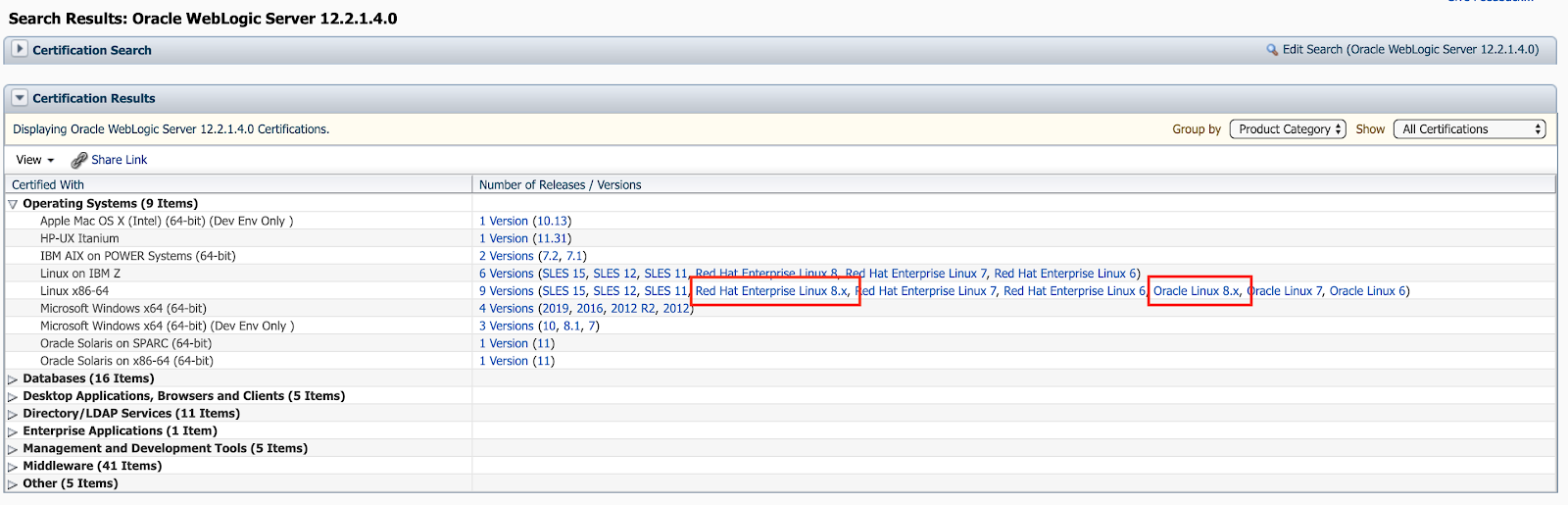
Oracle Fusion Middleware 12.2.1.4.0 certified with Linux 8

Currently Oracle certified the Oracle Fusion Middleware 12.2.1.4.0 Components for the use of Linux 8, which includes the Oracle Linux 8 and the Red Hat Enterprise Linux 8.

You can find the newly added certifications in My Oracle Support (https://support.oracle.com) under the tab Certifications:

Oracle WebLogic 12.2.1.4.0 Certification:


Oracle Forms & Reports 12.2.1.4.0 Certification:


Oracle SOA Suite 12.2.1.4.0 Certification:


Moreover you can find the corresponding Oracle Fusion Middleware 12c Certifications under https://www.oracle.com/middleware/technologies/fusion-certification.html and there the Excel Sheet https://www.oracle.com/technetwork/middleware/fmw-122140-certmatrix-5763476.xlsx which contains the newly added certification for Linux 8 (Oracle Linux 8 and Red Hat Enterprise Linux 8).

Under the "Oracle Fusion Middleware System Requirements and Specifications" documentation for 12.2.1.4.0 in the section "Linux Operating System Requirements" (https://docs.oracle.com/en/middleware/fusion-middleware/12.2.1.4/sysrs/system-requirements-and-specifications.html#GUID-37C51062-3732-4A4B-8E0E-003D9DFC8C26) you can find all required packages to be installed.
Take note that 2 of them are EL7 packages (compat-libcap1-1.10-7.el7.x86_64 and compat-libstdc++-33-3.2.3-72.el7.x86_64), which are not longer present in the Linux 8 distributions, so when you install your Fusion Middleware 12.2.1.4.0 components just ignore the warnings/failure for the 2 EL7 packages by using the Skip button in the graphical installer.


Wednesday, September 14, 2016

Microsoft SQL Server under Linux - Preview

Today something off topic, as I am normally blogging about Oracle Fusion Middleware stuff.

Microsoft SQL Server under Linux - Preview ... many of you (specially the Oracle Guys) might think now "WHAT ????", but its really true.
Some months ago Microsoft announced that they will release a SQL Server Version for Linux and I was lucky to get into the Preview Program.

The installation of the SQL Server under Linux (currently supported under Ubuntu 16 or RedHat 7) is quite easy and its completed in around 15 minutes (depending of your download speed).

What is quite cool, is that the SQL Server can also be installed under Docker :-)

It's really SQL Server under Linux :-)


As a native UNIX User I recognised one small thing, which were disturbing me, when you want to restore a Database Backup you have to use Windows Path notations which will be internally mapped to UNIX Path notations, but I am pretty sure that within the next Releases or at least with the final Release this small problem will be adjusted.


From the first look, SQL Server on Linux looks quite interesting.

Friday, June 6, 2008

Applying Oracle Application Server Patch 3 on Linux x86_64

Since a short time the Oracle Application Server 10g Release 2 Patch 3 (10.1.2.3.0) is available.

If you try to apply the Patch on a Linux x86_64 system, you will run in linking errors. To avoid this errors, execute as root user following steps:

  1. cd /usr/bin
  2. mv /usr/bin/gcc /usr/bin/gcc.save
  3. mv /usr/bin/g++ /usr/bin/g++.save
  4. # create a new file under /usr/bin named: gcc with following content:
    /usr/bin/gcc.save -m32 $*
  5. # Dont forget to make it executable:
    chmod 755 gcc
  6. # Create a sym link for g++
    ln -s gcc g++
After this steps login as the oracle installation user, switch to linux32 bash and start the runInstaller

Now the Patch should be run without linking errors.

Don't forget to move back after the patch installation to your original gcc and g++

Friday, May 23, 2008

Installing WebCache Standalone 10.2.0.2 on Redhat 64bit

Original posted 14th Sept 2007:

Sometime ago I run in some problems during the installation of Oracle WebCache Standalone 10.2.0.2 on an Redhat 4 x86_64 system. All prerequirements were made, the Oracle Universal Installer didn't complain anything, but during the link process following error message came up:

  • error while loading shared libraries: libclntsh.so.10.1: cannot open shared object file: No such file or directory

After some investigations my ex-colleague from Trivadis (Engelbert Wystrach) and me came to following solution:

  • create as root user following two files in the directory /usr/bin
  • gcc296
    #!/bin/sh
    exec /usr/bin/gcc32 -m32 -static-libgcc -B /usr/lib/gcc-lib/i386-redhat-linux/2.96/ $*
  • g++296
    #!/bin/sh
    exec /usr/bin/g++32 -m32 -static-libgcc -B /usr/lib/gcc-lib/i386-redhat-linux/2.96/ $*
  • execute as root following commands:
    cd /usr/bin
    mv gcc gcc.save
    mv g++ g++.save
    ln -s /usr/bin/gcc296 /usr/bin/gcc
    ln -s /usr/bin/g++296 /usr/bin/g++
After you made this changes, start the Oracle Universal Installer once again and install the Oracle WebCache Standalone. This error occurs only on Redhat 64bit systems :-(

Reports 10.1.2. and SuSE Enterprise Linux 10

Original posted 11th Sept 2007:

Officially the Oracle AS 10.1.2 is not yet certified with SLES 10 and therefor Reports 10.1.2. is not certified. Nevertheless the Oracle AS 10.1.2 is installable on SLES 10, but if you try to run a Report you are receiving an error.

The corresponding logfile $ORACLE_HOME/opmn/logs/OC4J~OC4J_BI_Forms~default_island~1 shows following error stack:

  • java.lang.UnsatisfiedLinkError:
    /u00/app/oracle/product/as-fr-10.1.2/lib/librwu.so:
    /usr/X11R6/lib/libXm.so.2: undefined symbol: _Xsetlocale

To resolve this problem perform following steps:

  1. su - root
  2. cd /usr/X11R6/lib
  3. mv -f libXm.so.2 libXm.so.2.backup
  4. ln -s libXm.so.3 libXm.so.2

After that stop and restart the OC4J Instance OC4J_BI_Forms as oracle user:

  1. opmnctl stopproc process-type=OC4J_BI_Forms
  2. opmnctl startproc process-type=OC4J_BI_Forms
Now you can run Oracle Reports under SLES 10, but please note, that at the moment Oracle AS 10.1.2 is not yet certified with SLES 10!

Oracle Internet Directory Light for tnsnames Resolution

Original posted 9th Sept 2007:

Since a few days the Oracle Authentication Service for Linux (http://www.oracle.com/technology/products/oid/oracleauthenticationservices.html) is available. Mainly this technology preview is addressed to handle User Authentication of Linux Desktops.
I had a closer look on this product and what I saw is, that the Oracle Authentication Service for Linux is an Oracle Internet Directory (OID) just as an RPM-File (Size 70 MB :-) ). The installation is really simple, download the OID Light and the Oracle XE Database for Linux, and run as root user "rpm -Uhv oracle-oid-10.1.4.2.0-1.0.i386.rpm oracle-xe-univ-10.2.0.1-1.0.i386.rpm".
After this you have to configure the Oracle XE Database and the Oracle Internet Directory, execution as root user of the script "/etc/init.d/oracle-oid configure" and answer the following questions:
  1. Password of sys user of your XE Database
  2. Password of the OID administrator (cn=orcladmin)
  3. Ports (Non-SSL and SSL) for the OID
  4. Naming Context of your OID (e.g. dc=trivadis,dc=com)
  5. If you want to use SSL Authentification for your OID

And now the interesting part. Many people are planning to migrate their local tnsnames.ora to be stored in an Oracle Internet Directory. Up to now all them had to use the Oracle Application Server 10.1.4.0.1 Identity Management (nearly 1.3 GB :-( ) and an Oracle Database Enterprise Edition. For small companies this is really an overhead! Now you can use this lightweight environment of the Oracle XE Database and the OID Light for Linux.
Following steps need to be performed to load your tnsnames.ora into the OID Light and to configure your clients against it.
  1. In your Oracle Client configure the sqlnet.ora
    NAMES.DIRECTORY_PATH = (LDAP)
    NAMES.DEFAULT_DOMAIN = trivadis.com # adjust to your domain
  2. In your Oracle Client configure the ldap.ora
    DIRECTORY_SERVERS = (oassrv01.trivadis.com:389:636) # adjust to your servername and LDAP ports
    DEFAULT_ADMIN_CONTEXT = "dc=trivadis,dc=com" # adjust to your Naming Context
    DIRECTORY_SERVER_TYPE = OID
After this configuration steps start your netmgr and connect to your OID:


Over the menu option "Command / Directory / Export Net Service Names..." you can import your actual tnsnames.ora into OID Light.


For testing whether your Oracle Client is really using your OID or not, just make a small test with tnsping. You should see then "Used LDAP adapter to resolve the alias".
The Oracle Internet Directory Light is really a cool alternative to the huge Oracle Application Server 10g Identity Management, but as usual there are some small limitations in the OID Light (e.g. no MultiMaster Replication, no OPMN, no Cluster Options). But for a small environment or just for testing it is really cool stuff :-)

Note: I saw that many people are access this blog post, unfortunally this post was done in May 2008 and the "OID Light" solution has been removed from the Oracle Technology Network website :-(
The new solution is the standard Oracle Internet Directory 11g, more details can be found here: http://www.oracle.com/technetwork/middleware/id-mgmt/overview/oracleauthenticationservices-100184.html
Maybe its a good idea, if anybody who is interested in getting back this cool OID Light solution, that you do a Forum Post in the Oracle Technology Network Forum http://forums.oracle.com/forums/forum.jspa?forumID=398&start=0

Additional Note 1st April 2011, Not an Aprils fools joke :-) : As you can see in comments down, I receive a notice by Olaf Stullich (Oracle Product Manager for OID)

The OID 10g (10.1.4.3) RPM can be found on channel (el4_i386_oracle) in the Oracle ULN. When you register your machine on ULN you can install the OID RPM via "up2date oracle-oid".