This Blog is discontinued, its only read-only

Showing posts with label Oracle Forms 12c. Show all posts

Monday, October 26, 2020

Oracle Forms & Reports 12.2.1.4.0 certified with ATP

Since a few days, the current release of Oracle Forms & Reports 12.2.1.4.0 is officially certified with the use of Oracle Autonomous Transaction Processing (ATP) Database.

You can use the ATP Database for the Metadata Repository for Oracle Forms & Reports 12.2.1.4.0 and/or as application Database.

The certification you can see in the What's new Guide https://docs.oracle.com/en/middleware/developer-tools/forms/12.2.1.4/releasenotes-fnr/whats-new-this-release.html#GUID-5D5D50BB-9358-4009-A324-024EF97CA3D8

In the Oracle Fusion Middleware 12c Certification Excel Sheet for 12.2.1.4.0, https://www.oracle.com/technetwork/middleware/fmw-122140-certmatrix-5763476.xlsx you can see the certification for the usage of ATP databases as well:


Monday, August 24, 2020

Oracle Forms & Reports 12.2.1.4.0 on Oracle Linux 8 / Redhat 8

Oracle Forms & Reports 12.2.1.4.0 is officially supported and certified with Oracle Linux 8 and Redhat 8. But in case you want to install the Oracle Forms & Reports 12.2.1.4.0 you will see that you are running into an error while performing the prerequirement check.


#
Starting check : CertifiedVersions
Expected result: One of oracle-7, redhat-7, redhat-6, oracle-6, SuSE-11, SuSE-12, SuSE-15
Actual Result: redhat-8.2
Check complete. The overall result of this check is: Passed
CertifiedVersions Check: Success.

Starting check : Packages
Checking for binutils-2.23.52.0.1; found binutils-2.30-73.el8-x86_64.	Passed
Checking for compat-libcap1-1.10; Not found.	Failed
Checking for compat-libstdc++-33-3.2.3-x86_64; Not found.	Failed
Checking for libgcc-4.8.2-x86_64; found libgcc-8.3.1-5.el8-x86_64.	Passed
Checking for libstdc++-4.8.2-x86_64; found libstdc++-8.3.1-5.el8-x86_64.	Passed
Checking for libstdc++-devel-4.8.2-x86_64; found libstdc++-devel-8.3.1-5.el8-x86_64.	Passed
Checking for sysstat-10.1.5; found sysstat-11.7.3-2.el8-x86_64.	Passed
Checking for gcc-4.8.2; found gcc-8.3.1-5.el8-x86_64.	Passed
Checking for gcc-c++-4.8.2; found gcc-c++-8.3.1-5.el8-x86_64.	Passed
Checking for ksh-...; found ksh-20120801-254.el8-x86_64.	Passed
Checking for make-3.82; found make-1:4.2.1-10.el8-x86_64.	Passed
Checking for glibc-2.17-x86_64; found glibc-2.28-101.el8-x86_64.	Passed
Checking for glibc-devel-2.17-x86_64; found glibc-devel-2.28-101.el8-x86_64.	Passed
Checking for libaio-0.3.109-x86_64; found libaio-0.3.112-1.el8-x86_64.	Passed
Checking for libaio-devel-0.3.109-x86_64; found libaio-devel-0.3.112-1.el8-x86_64.	Passed
Checking for motif-2.3.4; found motif-2.3.4-16.el8-x86_64.	Passed
Check complete. The overall result of this check is: Failed

As you can see from above, the Oracle Installer is failing because of the missing packages compat-libcap1-1.10 and compat-libstdc++-33-3.2.3-x86_64.
These 2 packages can not be found in the Oracle Linux 8 and Redhat 8 distrubition, they have been removed since Release 8.

To resolve this problem, you will need to download the Patch 31190532 from My Oracle Support, transfer the patch to your target server, extract the patch somewhere and modify your Oracle Installer startup command as follows:

#
./fmw_12.2.1.4.0_fr_linux64.bin -prereqConfigLoc <Path_to_the_patch>/31190532/prereq_metadata/oracle.as.install.fr.prerequisite/prereq

and now the Oracle Installer will successfully pass the prerequirement checks:

#
Starting check : CertifiedVersions
Expected result: One of oracle-8, oracle-7, redhat-8, redhat-7, redhat-6, oracle-6, SuSE-11, SuSE-12, SuSE-15
Actual Result: redhat-8.2
Check complete. The overall result of this check is: Passed
CertifiedVersions Check: Success.

Starting check : Packages
Checking for binutils-2.23.52.0.1; found binutils-2.30-73.el8-x86_64.	Passed
Checking for libcap-2.25-9; found libcap-2.26-3.el8-x86_64.	Passed
Checking for libstdc++-8.2.1-3.5.0.1.el8-x86_64; found libstdc++-8.3.1-5.el8-x86_64.	Passed
Checking for libgcc-4.8.2-x86_64; found libgcc-8.3.1-5.el8-x86_64.	Passed
Checking for libstdc++-devel-4.8.2-x86_64; found libstdc++-devel-8.3.1-5.el8-x86_64.	Passed
Checking for sysstat-10.1.5; found sysstat-11.7.3-2.el8-x86_64.	Passed
Checking for gcc-4.8.2; found gcc-8.3.1-5.el8-x86_64.	Passed
Checking for gcc-c++-4.8.2; found gcc-c++-8.3.1-5.el8-x86_64.	Passed
Checking for ksh-...; found ksh-20120801-254.el8-x86_64.	Passed
Checking for make-3.82; found make-1:4.2.1-10.el8-x86_64.	Passed
Checking for glibc-2.17-x86_64; found glibc-2.28-101.el8-x86_64.	Passed
Checking for glibc-devel-2.17-x86_64; found glibc-devel-2.28-101.el8-x86_64.	Passed
Checking for libaio-0.3.109-x86_64; found libaio-0.3.112-1.el8-x86_64.	Passed
Checking for libaio-devel-0.3.109-x86_64; found libaio-devel-0.3.112-1.el8-x86_64.	Passed
Checking for motif-2.3.4; found motif-2.3.4-16.el8-x86_64.	Passed
Check complete. The overall result of this check is: Passed
Packages Check: Success.

Monday, March 30, 2020

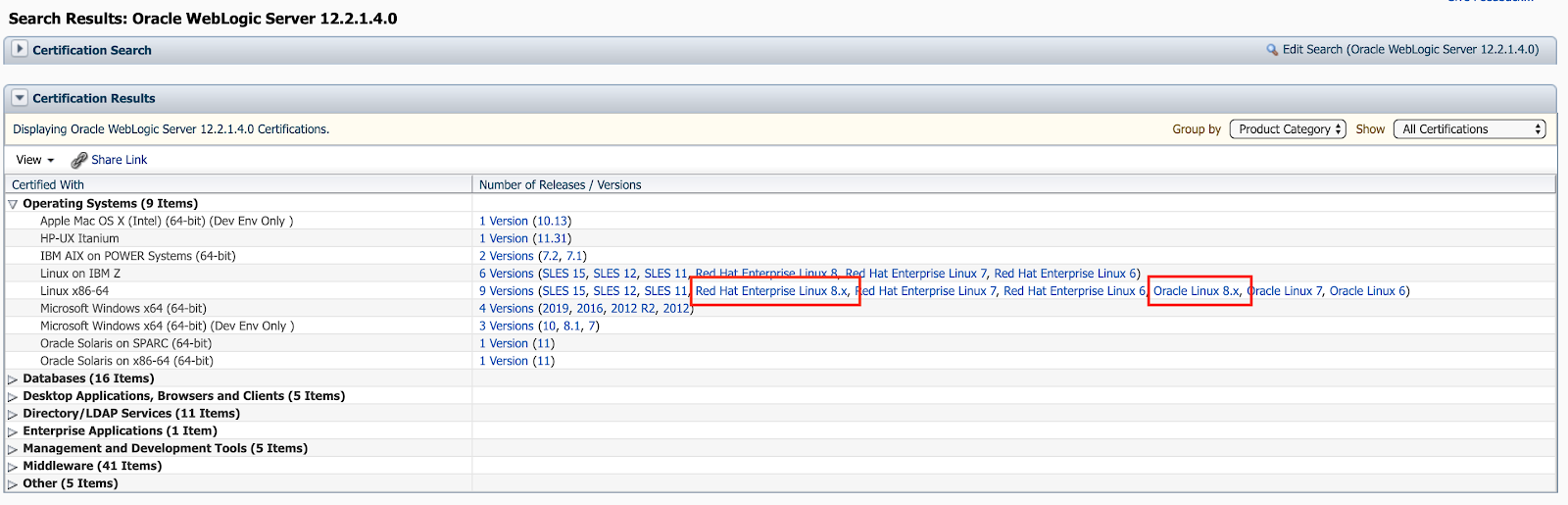
Oracle Fusion Middleware 12.2.1.4.0 certified with Linux 8

Currently Oracle certified the Oracle Fusion Middleware 12.2.1.4.0 Components for the use of Linux 8, which includes the Oracle Linux 8 and the Red Hat Enterprise Linux 8.

You can find the newly added certifications in My Oracle Support (https://support.oracle.com) under the tab Certifications:

Oracle WebLogic 12.2.1.4.0 Certification:


Oracle Forms & Reports 12.2.1.4.0 Certification:


Oracle SOA Suite 12.2.1.4.0 Certification:


Moreover you can find the corresponding Oracle Fusion Middleware 12c Certifications under https://www.oracle.com/middleware/technologies/fusion-certification.html and there the Excel Sheet https://www.oracle.com/technetwork/middleware/fmw-122140-certmatrix-5763476.xlsx which contains the newly added certification for Linux 8 (Oracle Linux 8 and Red Hat Enterprise Linux 8).

Under the "Oracle Fusion Middleware System Requirements and Specifications" documentation for 12.2.1.4.0 in the section "Linux Operating System Requirements" (https://docs.oracle.com/en/middleware/fusion-middleware/12.2.1.4/sysrs/system-requirements-and-specifications.html#GUID-37C51062-3732-4A4B-8E0E-003D9DFC8C26) you can find all required packages to be installed.
Take note that 2 of them are EL7 packages (compat-libcap1-1.10-7.el7.x86_64 and compat-libstdc++-33-3.2.3-72.el7.x86_64), which are not longer present in the Linux 8 distributions, so when you install your Fusion Middleware 12.2.1.4.0 components just ignore the warnings/failure for the 2 EL7 packages by using the Skip button in the graphical installer.


Thursday, February 20, 2020

Cleanup Oracle Fusion Middleware 12c Repository manually

Currently I was cleaning up some of my Oracle Fusion Middleware Forms & Reports test and demo environments manually and wanted to setup them freshly.

As I was lazy, I didn't used the RCU (Repository Creation Utility) for the cleanup, I just did a manual drop user and drop tablespace and cleaned up my $DOMAIN_HOME.

In my case it was a Forms & Reports environment with the Prefix FR12213, so I manually dropped all the Repository Users starting with FR12213 and the corresponding tablespaces.

#
sqlplus / as sysdba

SQL> drop user FR12213_OPSS cascade;
SQL> drop user FR12213_STB cascade;
SQL> drop user FR12213_MDS cascade;
SQL> drop user FR12213_IAU_APPEND cascade;
SQL> drop user FR12213_IAU_VIEWER cascade;
SQL> drop user FR12213_IAU cascade;
SQL> drop user FR12213_WLS_RUNTIME cascade;
SQL> drop user FR12213_WLS cascade;
SQL> drop user FR12213_UMS cascade;

SQL> drop tablespace FR12213_IAS_OPSS including content and datafiles;
SQL> drop tablespace FR12213_IAS_TEMP including content and datafiles;
SQL> drop tablespace FR12213_IAS_UMS including content and datafiles;
SQL> drop tablespace FR12213_IAU including content and datafiles;
SQL> drop tablespace FR12213_MDS including content and datafiles;
SQL> drop tablespace FR12213_STB including content and datafiles;
SQL> drop tablespace FR12213_WLS including content and datafiles;

After that I simply cleaned up the $DOMAIN_HOME and wanted to create the complete WebLogic Domain again including the run of the RCU, everything in silent mode.

While running the RCU following error came up:

#
Processing command line ....
Repository Creation Utility - Checking Prerequisites
Checking Global Prerequisites

ERROR - RCU-6016 Invalid prefix specified.
CAUSE - RCU-6016 The specified prefix already exists.
ACTION - RCU-6016 Specify another prefix.

ERROR - RCU-6091 Component validation failed.
CAUSE - RCU-6091 One or more component specific validation failed.
ACTION - RCU-6091 Check log for more details and fix the validation error.

After a bit of searching around and think, I came to the table SYSTEM.SCHEMA_VERSION_REGISTRY$

#
sqlplus / as sysdba
SQL> select distinct(MRC_NAME) from SYSTEM.SCHEMA_VERSION_REGISTRY$;

MRC_NAME
------------------------------
FR12213

SQL> delete from SYSTEM.SCHEMA_VERSION_REGISTRY$ where MRC_NAME = 'FR12213';
SQL> commit;

After deleting the corresponding rows in the SYSTEM.SCHEMA_VERSION_REGISTRY$ table, the silent execution of the RCU was running without any errors.
So don't forget to cleanup the SYSTEM.SCHEMA_VERSION_REGISTRY$ if you are performing a manual cleanup :-)

The above concept applies to any Oracle Fusion Middleware Component which is using Repository Users created by the RCU (SOA Suite, Forms & Reports and so on)


Thursday, February 6, 2020

Huge Number of component_event.xlf* and pki_data*.tmp files in /tmp in Oracle Forms & Reports 12c

If you are running an Oracle Forms and Reports 12c (12.2.1.+) environment over quite some time, you might discover that under the /tmp directory are a quite huge number of files named component_event.xlf* and pki_data*.tmp are generated and filling up your /tmp space.

The pki_data*.tmp files are usually 0 Bytes, but the component_event.xlf* files are between some Bytes up to some 100 Bytes. Over some time, these files are really fill up your /tmp.

These files are generated by the Oracle Platform Security for Java component and they are holding temporarily cache data.

In order to get rid of the component_event.xlf* files, you will just to have modify two configuration files of your WebLogic Domain.

In the configuration file $DOMAIN_HOME/config/fmwconfig/jps-config.xml find the following line and comment this line out.

#
# Original line
<serviceInstanceRef ref="audit.db"/>

# Modified line
<!-- serviceInstanceRef ref="audit.db"/ -->

The second configuration file is the $DOMAIN_HOME/config/fmwconfig/jps-config-jse.xml. Find the following line and comment this line out.

#
# Original line
<serviceInstanceRef ref="audit.db"/>

# Modified line
<!-- serviceInstanceRef ref="audit.db"/ -->

After the above modifications are done, you will have to restart your WebLogic Domain and you can see that no more component_event.xlf* are generated.
There are just the pki_data*.tmp files, but these files are usually 0 Bytes. For this files you can use a normal housekeeping job to clean them up regulary.


Tuesday, October 1, 2019

Oracle Forms 12.2.1.4.0 - New Security Handling for userid

In the latest Oracle Forms 12.2.1.4.0 Release, Oracle has implemented a new cool feature for security handling of the userid parameter.

Classically within the formsweb.cfg you are defining your section for your Forms Application, e.g.

#

# The values for userid are provided in cleartext
[demo]
WebUtilArchive=frmwebutil.jar,jacob.jar
WebUtilLogging=off
WebUtilLoggingDetail=normal
WebUtilErrorMode=Alert
WebUtilDispatchMonitorInterval=5
WebUtilTrustInternal=true
WebUtilMaxTransferSize=16384
baseHTML=webutilbase.htm
baseHTMLjpi=webutiljpi.htm
archive=frmall.jar
lookAndFeel=oracle
form=test.fmx
userid=scott/tiger@prod


Now, with Oracle Forms 12.2.1.4.0, after you started the AdminServer of your Oracle Forms & Reports 12.2.1.4.0 environment, the value for the parameter userid will be automatically encrypted.
This is managed via the new parameter forms.userid.encryption.enabled=true for $EXTRA_JAVA_PROPERTIES inside the $DOMAIN_HOME/bin/setDomainEnv.sh script.

After you have started up your AdminServer the value for the parameter userid inside the formsweb.cfg will be encrypted:

#

# After the startup of the AdminServer the value
# for the parameter userid is encrypted
[demo]
WebUtilArchive=frmwebutil.jar,jacob.jar
WebUtilLogging=off
WebUtilLoggingDetail=normal
WebUtilErrorMode=Alert
WebUtilDispatchMonitorInterval=5
WebUtilTrustInternal=true
WebUtilMaxTransferSize=16384
baseHTML=webutilbase.htm
baseHTMLjpi=webutiljpi.htm
archive=frmall.jar
lookAndFeel=oracle
form=test.fmx
userid={AES}E/vW+IIt0wtgdExtevDqrg==


Saturday, September 28, 2019

Oracle Forms & Reports 12.2.1.4.0 - First Look

Yesterday I was blogging about the new Oracle Forms & Reports 12.2.1.4.0 Release.

Today I got some spare time to install and configure the latest Oracle Forms & Reports 12.2.1.4.0 Release on one of my test VM's.

My configuration is as follows:
The installation and configuration is the same as under the previous Oracle Forms & Reports 12.2.1.3.0 Release.
At first install and configure your Oracle Database, I have created an Oracle 19c Instance with one PDB, which will be my target Database for the required Metadata Repository for Oracle Forms & Reports 12.2.1.4.0.
Next step is to install the JDK (or better to say unzip your Oracle Server JRE 8u221, you can even use a full JDK).
After that, install your Oracle WebLogic Server Infrastructure 12.2.1.4.0 and when this is done, install into the same MW_HOME your Oracle Forms & Reports 12.2.1.4.0 software.

Now, we can start to configure the required stuff. At first you need to run the Repository Creation Utility ($MW_HOME/oracle_common/bin/rcu), when this is done, we can configure the Oracle WebLogic Domain for Forms & Reports with the config.sh script located under $MW_HOME/oracle_common/common/bin).

When the configuration part is done, just startup your Node Manager with $DOMAIN_HOME/bin/startNodeManager.sh and after that your AdminServer with $DOMAIN_HOME/startWebLogic.sh

Now you can either start the Managed Servers (WLS_FORMS and WLS_REPORTS) from the WebLogic Console http://:7001/console or with the script $DOMAIN_HOME/bin/startManagedWebLogic.sh

Just to test, if your Forms Environment is working, get the frmsal.jar (located under $MW_HOME/forms/java) to your Desktop and execute following command:

#
# java -jar frmsal.jar -url "Full Qualified Server including the Configuration" [-t <timeout in milliseconds>] [-showConfig false|true]
java -jar frmsal.jar -url "http://<Your_ServerName>:9001/forms/frmservlet?config=standalone" -showConfig true

Config parameters from server are:
    CODEBASE=/forms/java
    ARCHIVE=frmall.jar
    WIDTH=750
    HEIGHT=600
    NAME=
    serverURL=/forms/lservlet?ifcfs=/forms/frmservlet?config=standaloneapp&standaloneapp=1&ifsessid=WLS_FORMS.formsapp.2&acceptLanguage=en-us
    networkRetries=0
    splashScreen=
    background=
    lookAndFeel=Oracle
    colorScheme=swan
    customColorScheme=
    serverApp=
    logo=
    imageBase=codebase
    formsMessageListener=
    recordFileName=
    EndUserMonitoringEnabled=false
    EndUserMonitoringURL=
    heartBeat=
    MaxEventWait=
    disableValidateClipboard=false
    allowAlertClipboard=true
    digitSubstitution=context
    highContrast=false
    disableMDIScrollbars=
    clientDPI=
    applet_stop_timeout=800
    guiMode=0
    idleTimeout=
    isResizable=
    centerOnStartup=
    alwaysOnTop=
    mediaBase=codebase
    webFormsTitle=Oracle Fusion Middleware Forms Services
Inspecting archive files in cache directory /var/folders/b_/ldw8b91n7h7dp58hd3xf2qmc0000gn/T/frmsal/greenfield/12.2.1.4
Downloading archive file frmall.jar to cache subdirectory ermz9mn700rz58gniz4ftx8un
Forms Session ID is WLS_FORMS.formsapp.2
The proxy host is null, and the proxy port is 0.
Native HTTP implementation is being used for the connection.
The connection mode is HTTP.
Forms Applet version is 12.2.1.4

With the optional option "-showConfig true" your java call on the frmsal.jar will display you the Forms Configuration in your shell or Command Prompt.

Now you should see following:


Enjoy the new Oracle Forms & Reports 12.2.1.4.0 Release, I will post in the next days more blog posts about the latest Oracle Forms & Reports 12.2.1.4.0 Release ...


Friday, September 27, 2019

Oracle Forms & Reports 12.2.1.4.0 available

Since today the new long awaited Oracle Forms & Reports Release 12.2.1.4.0 is available, this is after 2 years now the next release of Oracle Forms & Reports.

The software can be found under: https://www.oracle.com/middleware/technologies/forms/downloads.html


The corresponding documentation can be found under https://docs.oracle.com/en/middleware/developer-tools/forms/12.2.1.4/index.html


As expected the new features are as follows:

  • SSO Support for Forms Standalone Launcher (FSAL)
  • Forms Standalone Launcher (FSAL) is compatible with Java 11.0.2 (LTS)
  • Increased Text Length for Text or Display Items, from 65534 to 2097151
  • The Oracle Database Client Software within the Middleware Home is now updated to 12.1.0.2190716

Also Oracle added a new System Requirements and Supported Platforms for Oracle Fusion Middleware 12c (12.2.1.4.0) Excel Sheet under https://www.oracle.com/technetwork/middleware/fmw-122140-certmatrix-5763476.xlsx

Enjoy the new Oracle Forms & Reports 12.2.1.4.0 Release :-)


Monday, September 23, 2019

OOW19: Oracle Forms News

Since today many of the Oracle OpenWorld 2019 presentations are available under https://events.rainfocus.com/widget/oracle/oow19/catalogow19?

For Oracle Forms & Reports are 2 interesting presentations are available:

As usual every content from the above slides are covered under the Oracle Safe Harbor Statement :-)
The following is intended to outline our general product direction. It is intended for information purposes only, and may not be incorporated into any contract. It is not a commitment to deliver any material, code, or functionality, and should not be relied upon in making purchasing decisions. The development, release, timing, and pricing of any features or functionality described for Oracle’s products may change and remains at the sole discretion of Oracle Corporation.

In general there will be a new Oracle Forms Release, Oracle Forms 12.2.1.4.0, which will be also the Terminal Release for Oracle Forms 12.2.1.x. The Oracle Forms 12.2.1.4.0 is announced for Q3/2019.

The most interesting new features from my point of view will be:

Forms Standalone Launcher (FSAL)
  • SSO Support :-)
  • Java 8 & Java 11 Support :-)
  • Showing Configuration Details on startup
  • Improvements in Cache Handling including an option to disable the Cache
Forms Application Deployment Services (FADS)
  • Support for SQLDeveloper 18.2+
  • Support for Oracle Databases 12.2+
  • WebUtil enabled Applications will be supported
Forms Runtime:
  • Text fields are increased to a max size of 2M

Moreover you can see from the OOW19 "Oracle Forms: What's New and What's Cloud" presentation, thats Oracle is pushing more and more for the Oracle Cloud Offering for Oracle Forms & Reports.
Oracle is promising that you will be able to get an Oracle Forms & Reports 12.2.1.3.0 environment to be ready in under 15 minutes. With following stuff:
  • Oracle Database 18.3
  • WebLogic Infrastructure 12.2.1.3
  • Oracle Forms & Reports 12.2.1.3, but Reports are not configured, so in case you know what to do, you can add another 10 to 15 minutes to configure your Oracle Reports
  • JDK 8 Update 211

My personal Long Term Future for Oracle Forms assumptions are, based on the OOW19 presentation "Catalog ID: THT5008: Oracle Fusion Middleware Roadmap: See What's New and What's Coming" (Page 19) https://static.rainfocus.com/oracle/oow19/sess/1554316945388001WhJp/PF/THURS_1200_Oracle%20Fusion%20Middleware%20Roadmap%20See%20Whats%20New%20and%20Whats%20Coming_1568995098562001vCqc.pdf is that within the next 2 years we will see a Forms Release 14.1 (I still wonder who came to this Version Numbering???).


Friday, June 28, 2019

Oracle 19c Certified for Oracle Fusion Middleware 12.2.1.2.0 and 12.2.1.3.0

Since a few days Oracle updated the Certified Matrix for the Oracle Fusion Middleware Products concerning certified Oracle Databases.

Now Oracle 19c (19.3+) is certified with Oracle Fusion Middleware 12.2.1.2.0 and 12.2.1.3.0.

For example Oracle WebLogic Server 12.2.1.3.0 / 12.2.1.2.0 can use an Oracle 19c Database as target database for AppData, Repository Creation Utility (RCU) and WLS Features.


The same applies to Oracle Forms & Repors 12.2.1.3.0 / 12.2.1.2.0.


As well for Oracle SOA Suite 12.2.1.3.0 / 12.2.1.2.0


The complete certification matrix can be retrieved either in My Oracle Support https://support.oracle.com under the tab "Certifications" or on the Oracle Technical Resources (formerly Oracle Technology Network) website https://www.oracle.com/technetwork/middleware/ias/downloads/fusion-certification-100350.html


Friday, June 29, 2018

Oracle Forms 12.2.1.3.0 and FRM- 93552 on Windows

I recently had a project for installing and configure Oracle Forms & Reports 12.2.1.3.0 on a Windows 2016 Server. While the installation and configuration of Oracle Forms & Reports 12.2.1.3.0 went really smooth, I was hitting directly after using the Oracle provided Test Forms under http://:/forms/frmservlet the FRM-93552 error.

The official Oracle Documentation states that you have to install the Microsoft Visual C++ Redistributable 2012 (VC++ 11.0), but with this Version you will hit the FRM-93552 error message while calling your Forms.

You will need to install the Microsoft Visual C++ Redistributable 2010 (VC++ 10.0), which you can find under following link https://www.microsoft.com/en-us/download/details.aspx?id=14632


Just install the above mentioned version of the Microsoft Visual C++ Redistributable 2010, you can have multiple version of the Microsoft Visual C++ Redistributable package at the same time on your server.

After the installation of the Microsoft Visual C++ Redistributable 2010 simple stop and start your Managed Server for Oracle Forms and the problem with the FRM-93552 error is gone.


Thursday, December 7, 2017

Oracle Forms & Reports on Docker - The Concept and Technique behind

In the last days I was working on my Oracle Forms & Reports in Docker solution and I already published it via my blog and in my personal GitHub Repository.

With this blog post, I want to explain the Concept and Technique behind my solution and the motivation.

Lets start with the motivation :-) With the Oracle Forms & Reports 12.2.x releases, Oracle has decided to remove the option to create script-based the WebLogic Domain for Oracle Forms & Reports. In case, I just have to install and configure one server with Oracle Forms & Reports, its quite fine to click through the Domain Configuration Wizard, but normally you don't have to configure just one environment, mostly 3 or more environments. Questions directed to Oracle, if the script-based configuration will be enabled again, were just answered with "you have to use the graphical Domain Configuration Wizard" ...
So, Jan-Peter Timmermann (https://jan-peter.me), Robert Crames (http://robertcrames.blogspot.ch) and I, were developing together a script set for installation and configuration of a complete Oracle Forms & Reports 12.2.x environment on Unix (Linux and so on) Servers, because we couldn't accept the fact, that we should start the Domain Configuration Wizard and click through several times just to create multiple Oracle Forms & Reports 12.2.x environments. 
The blog posts including the source code with the above mentioned solution can be found here:
We used this solution in our own test labs and also in real-life for customers, which reduced the efforts in installing and configuring Oracle Forms & Reports 12.2.x environments dramatically.

As I am a Docker fan and using heavily the by Oracle provided Docker solutions on https://github.com/oracle/docker-images, the next step was for me, to convert/integrate our script based solution for Oracle Forms & Reports into a Docker Image and here we are ...

The concept and technique behind the Oracle Forms & Reports in Docker solution is quite straight forward and simple.

Assuming you have a server with Docker (I personally prefer an Oracle Enterprise Linux 7.4 with Docker Engine from the Oracle Repos), you just have to decide if your Oracle Database for the required Metadata Repository for Oracle Forms & Reports should be also residing in your Docker or you have somewhere else (native) an Oracle Database (I am using an Oracle Database inside Docker on the same Docker server).
So at first you will pull your Oracle Linux 7 Image, which will be used as Base Image for your Oracle Database Image. For this I highly recommend the Oracle provided solution on GitHub (https://github.com/oracle/docker-images/tree/master/OracleDatabase) mainly maintained by Gerald Venzl (https://twitter.com/GeraldVenzl). After you got your Oracle DB Image installed, you just have to create your Oracle Database by following the instructions on https://github.com/oracle/docker-images/tree/master/OracleDatabase#running-oracle-database-in-a-docker-container.

The next step is to build up your Oracle Forms & Reports Stack, just get a copy of my GitHub Repository https://github.com/DirkNachbar/Docker. Download all the required Software binaries (JDK, Oracle WebLogic Server Infrastructure, Oracle Forms & Reports, optionally SQL Developer if you want to use Forms Application Deployment Services) for your desired Release (currently I am supporting Forms & Reports 12.2.1.2.0 and 12.2.1.3.0 ).

The first step is to create your JDK Image (I am using a full JDK and not a server-side version), based on Oracle Linux 7 Base Image (will be automatically pulled if not present).
As next you will need to create your WebLogic Server Infrastructure Image based on the prior created JDK Image. Within the creation of the WebLogic Server Infrastructure Image, I am also installing all required RPM's for Oracle Forms & Reports and fixing the libXm.so bug (without this fix Oracle Reports will not work).
After that you will need to create the Forms & Reports Image, based on the prior created WebLogic Server Infrastructure Image. During the build of the Oracle Forms & Reports Image, all required scripts for the Domain creation will be copied into the Image. These scripts will be used in the final step by the docker-compose file. In case you are using Forms & Reports 12.2.1.3.0, you have also the option to use Forms Application Deployment Services (FADS). For this, if the variable DC_FADS12C is set to true in the OracleFormsReports/setenv.sh, the Image will transfer the required SQL Developer binary file and replace the old version of the SQL Developer under the Oracle Forms & Reports ORACLE_HOME directory.

Before you proceed with the final step to create your Forms & Reports Domain, you need to align the script OracleFormsReports/setenv.sh. This is the most important step before you start with the Domain creation. 
Most of the variables, which will be declared within the setenv.sh script are self-explained, like DC_ADM_USER, DC_ADM_PWD and so on). Some variables you need to take care very well, like the DC_DB%. In case you don't align them to your environment, the creation of the Metadata Repository will fail and finally your Domain creation will fail. 
Another important variable is DC_USERHOME, this one configures the to be used volume on your Docker host, which will be mapped from your Docker Container. I am using volumes within the Forms & Reports Docker Container, which will contain the complete DOMAIN_HOME, because this allows you later on, to configure directly from your Docker host on the defined volume various settings, eg. formsweb.cfg, rwserver.conf, httpd.conf and so on. The defined DC_USERHOME you will have to create before you are starting with the Domain creation.

Finally (make sure that your target Database for the Metadata Repository is up and running) you can start the Domain Creation with the provided docker-compose file, which will create you a base domain, extend this with Forms & Reports, configure an Oracle HTTP Server (OHS) and creates you a Reports Server and finally it will configure port-forwarding from your Docker Container to your Docker Host of the most important ports, e.g. WebLogic Admin Server, Managed Servers and Oracle HTTP Server. The provided docker-compose script will take all the defined variables from the setenv.sh script and push them into to the to-be created Container, so that at the beginning mentioned script-set for creating the Domain for Forms & Reports can use them.
For fans of the new feature Forms Application Deployment Services (FADS), which is available from release 12.2.1.3.0 going. I have also implemented a pre-configuration task within the Domain creation for FADS, so that you just need later on, when your Container is running, to execute the fads_config.py script to get your FADS functionality. 

In case something goes wrong during the Domain creation, you can easily wipe out your half-Docker Container with "docker rm frfmw" and dont forget to cleanup below your defined volume ($DC_USERHOME/user_projects) potentially created directories like domains or applications. And then you can restart with the docker-compose your creation of the Docker Container.

The last step is, after a successful build of the Docker Container, to start the Container. For this you can use the command "docker start frfmw" and thats all ...

I will regularly update or enhance my Docker solution for Oracle Forms & Reports, so check out my GitHub Repository (https://github.com/DirkNachbar/Docker) from time to time. Or if you have some specific needs, just drop me a message here or give me a message in Twitter (https://twitter.com/DirkNachbar) or create a Issue on the GitHub Repository.

Last words: even when Oracle tells you, something is not possible, mostly it is ;-)

I hope you will enjoy and use my Docker solution for Oracle Forms & Reports ;-) 


Tuesday, December 5, 2017

Oracle Forms & Reports 12.2.1.3.0 with FADS in Docker

The next release of my Oracle Forms & Reports 12.2.1.3.0 Docker solution is now containing an option on running the Oracle Forms Application Deployment Services (FADS) within the Docker container.

The source code can be found under my personal GitHub Repository: https://github.com/DirkNachbar/Docker

Feel free to get a copy and enjoy playing around with Oracle Forms Application Deployment Services (FADS) under a Docker container.


Friday, December 1, 2017

Oracle Forms & Reports 12.2.1.3.0 in Docker

After I published yesterday my Docker solution for Oracle Forms & Reports 12.2.1.2.0, I received several question, if and when there will be a Docker solution for Oracle Forms & Reports 12.2.1.3.0.

Here we go, I spent once again some time and created the necessary Docker files and uploaded them to my GitHub Repository https://github.com/DirkNachbar/Docker

Now the above referenced Repository contains the necessary Docker files and docker-compose files for building Oracle Forms & Reports 12.2.1.2.0 and Oracle Forms & Reports 12.2.1.3.0.


In the README.md you will find two main sections, "How to build Oracle Forms & Reports 12.2.1.2.0" https://github.com/DirkNachbar/Docker#how-to-build-oracle-forms--reports-122120 and "How to build Oracle Forms & Reports 12.2.1.3.0" https://github.com/DirkNachbar/Docker#how-to-build-oracle-forms--reports-122130

Feel free to grab a copy of my Repository and enjoy Oracle Forms & Reports under Docker ;-)

Thursday, November 30, 2017

Oracle Forms & Reports 12.2.1.2.0 in Docker

As Robert Crames and me has developed some times ago a script set to install and configure Oracle Forms & Reports 12.2.1.2.0 completely silent and unattended, the next step was for me to port this all to Docker ;-)


Oracle has a really good GitHub Repository (https://github.com/oracle/docker-images) with several Oracle Products, but no Docker Image for Oracle Forms & Reports :-(

So I spent some time and managed to port our above mentioned script set for Oracle Forms & Reports 12.2.1.2.0 to build a Docker image for Oracle Forms & Reports.

The complete set of Docker build files and a docker-compose sample can be found under my GitHub Repository https://github.com/DirkNachbar/Docker

My solution is mainly based on Oracle Images, but very modified:

  • OracleJava:
    • instead of pulling an oraclelinux:7-slim, I am using an oraclelinux:latest.
    • instead of using an Oracle Server JRE, I am using an Oracle JDK 
  • OracleFMWInfrastructure:
    • within this Image, which is based on the above OracleJava Image, I am installing all required RPM's for Oracle Forms & Reports, eg. motif, compat-libstdc++-33 and so on and implementing the libXm.so fix directly for Oracle Reports
  • OracleFormsReports:
    • this is completely new developed by me. This installs on top of the OracleFMWInfrastructure Image the Oracle Forms & Reports 12.2.1.2.0 Software
    • with a sample docker-compose file you can create a required Oracle Database based on the Oracle Database Image https://github.com/oracle/docker-images/tree/master/OracleDatabase for the Metadata Repository and you can create the Oracle Forms & Reports 12.2.1.2.0 Domain including configuration of an Oracle HTTP Server and an Oracle Reports Server
    • The storage location for the Oracle Database Files will be a volume on your Docker host and also the storage location for the $DOMAIN_HOME of the Oracle Forms & Reports 12.2.1.2.0 Domain will be a volume on your Docker host.
      • With the usage of the volume on your Docker host, you are able to modify all Oracle Forms & Reports configuration files. E.g. formsweb.cfg, rwserver.conf and so on directly on your Docker host
I will regularly update my Repository, next ToDo is to provide Docker Images for Oracle Forms & Reports 12.2.1.3.0


So, feel free to pull my GitHub Repository and play around with my solution ;-) any comments, feature requests are welcome, just drop me a comment here ...

Update 1st December 2017: As I received several questions, if and when Oracle Forms & Reports 12.2.1.3.0 in Docker will be available in my GitHub Repository, I spent some time on it and here we go http://dirknachbar.blogspot.ch/2017/12/oracle-forms-reports-122130-in-docker.html


Friday, September 8, 2017

Oracle Forms 12.2.1.3.0 and the impact of new Required Support Files 12.1.0.2.0

With the latest Release of Oracle Forms & Reports 12.2.1.3.0 the Database Required Support Files got a facelift. Oracle moved the Database Required Support Files up from Release 11.2.0.3.0 to 12.1.0.2.0.

On the first look this seems not to be too dramatically, but when you check out the Release Note for Oracle Forms & Reports 12.2.1.3.0 Section Lifecycle Management Informations, you will find this statement http://docs.oracle.com/middleware/12213/formsandreports/releasenotes-fnr/lifecycle-management-information.htm#FRREL-GUID-241658D3-387D-4154-9484-1BF55D4EFFB7


Which means in short terms, once you open pre-12.2.1.3.0 Forms Sources with the latest Forms Builder 12.2.1.3.0, the Required Support Files will be updated to Version 12.1.0.2.0 and therefor your Forms Sources can not longer be open with a pre-12.2.1.3.0 Forms Builder . . . and also not longer compiled with frmcmp.sh or frmcmp_batch.sh from for example Oracle Forms 12.2.1.2.0.

So don't forget to make sufficient backups from your Forms Sources before you open them with the latest Oracle Forms Builder 12.2.1.3.0 Release !

Moreover the usual warning from Oracle, that you should not copy your compile Forms from one machine to another is still applicable :-)


Tuesday, September 5, 2017

Oracle Forms Application Deployment Services (FADS)

Within the latest release of Oracle Forms & Reports 12.2.1.3.0 is a really cool new feature - Oracle Forms Application Deployment Services (FADS).

FADS allows you to package, deploy, configure and store complete Forms Applications. A normal Forms Application contains executables like fmx, mmx and plx, but also jar's, html's. With FADS you can package them all together, version them.

The installation is quite simple, but ONLY if you follow the Standard Naming convention from Oracle :-(, which means DONT CHANGE the name of the Admin Server within your WebLogic Domain for Oracle Forms & Reports 12.2.1.3.0, the Admin Server name MUST be AdminServer !!!!

The reason for that is, that within the configuration script $ORACLE_HOME/forms/fads/fads_config.py all references for the Admin Server are hardcoded (!!!) with the name AdminServer.
In case you are like me and want to change that hardcoded values (2 times in line 69 and 1 time in line 255) from the hardcoded name "AdminServer" to the name of your AdminServer and you execute the fads_config.py script, you will be happy at the first stage ... the deployment will complete successfully ... but afterwards you can not use FADS, looks like that within the deployed ear files are also hardcoded references to the Admin Server name "AdminServer"

Snippet from $DOMAIN_HOME/servers/<Your Admin Server Name>/logs/fads-diagnostic.log as you can see internally com.bea:Name=AdminServer,Type=Server is even hardcoded :-(

[2017-09-04T10:39:54.024+02:00] [FRTESTAdminServer] [ERROR] [] [oracle.forms.fads.bundles] [tid: 136] [userId: <anonymous>] [ecid: 98ca6478-f846-4dc7-8614-317c730df63b-00000062,0] [APP: fads] [partition-name: DOMAIN] [tenant-name: GLOBAL] [SRC_CLASS: oracle.forms.fads.deployment.engine.config.DeploymentServiceConfig] [SRC_METHOD: <init>] FRM-80020 error parsing Deployment Services configuration file {0}[[
javax.management.InstanceNotFoundException: com.bea:Name=AdminServer,Type=Server
        at com.sun.jmx.interceptor.DefaultMBeanServerInterceptor.getMBean(DefaultMBeanServerInterceptor.java:1095)
        at com.sun.jmx.interceptor.DefaultMBeanServerInterceptor.getAttribute(DefaultMBeanServerInterceptor.java:643)
        at com.sun.jmx.mbeanserver.JmxMBeanServer.getAttribute(JmxMBeanServer.java:678)
        at weblogic.management.jmx.mbeanserver.WLSMBeanServerInterceptorBase$17.run(WLSMBeanServerInterceptorBase.java:466)
        at java.security.AccessController.doPrivileged(Native Method)
        at weblogic.management.jmx.mbeanserver.WLSMBeanServerInterceptorBase.getAttribute(WLSMBeanServerInterceptorBase.java:464)
        at weblogic.management.mbeanservers.internal.JMXContextInterceptor.getAttribute(JMXContextInterceptor.java:157)
        at weblogic.management.jmx.mbeanserver.WLSMBeanServerInterceptorBase$17.run(WLSMBeanServerInterceptorBase.java:466)
        at java.security.AccessController.doPrivileged(Native Method)
        at weblogic.management.jmx.mbeanserver.WLSMBeanServerInterceptorBase.getAttribute(WLSMBeanServerInterceptorBase.java:464)
        at weblogic.management.mbeanservers.internal.SecurityInterceptor.getAttribute(SecurityInterceptor.java:294)
        at weblogic.management.jmx.mbeanserver.WLSMBeanServerInterceptorBase$17.run(WLSMBeanServerInterceptorBase.java:466)
        at java.security.AccessController.doPrivileged(Native Method)
        at weblogic.management.jmx.mbeanserver.WLSMBeanServerInterceptorBase.getAttribute(WLSMBeanServerInterceptorBase.java:464)
        at weblogic.management.mbeanservers.internal.MBeanCICInterceptor.getAttribute(MBeanCICInterceptor.java:139)
        at weblogic.management.jmx.mbeanserver.WLSMBeanServerInterceptorBase$17.run(WLSMBeanServerInterceptorBase.java:466)
        at java.security.AccessController.doPrivileged(Native Method)
        at weblogic.management.jmx.mbeanserver.WLSMBeanServerInterceptorBase.getAttribute(WLSMBeanServerInterceptorBase.java:464)
        at weblogic.management.mbeanservers.internal.PartitionJMXInterceptor.getAttribute(PartitionJMXInterceptor.java:307)
        at weblogic.management.jmx.mbeanserver.WLSMBeanServerInterceptorBase$17.run(WLSMBeanServerInterceptorBase.java:466)
        at java.security.AccessController.doPrivileged(Native Method)
        at weblogic.management.jmx.mbeanserver.WLSMBeanServerInterceptorBase.getAttribute(WLSMBeanServerInterceptorBase.java:464)
        at weblogic.management.mbeanservers.internal.CallerPartitionContextInterceptor.getAttribute(CallerPartitionContextInterceptor.java:177)

In case you have environments with a Non-Oracle-Standard-Naming-Convention for your Admin Server, sorry, no chance currently to use FADS ...

In case you are Oracle-Standard-Naming-Convention conform, enjoy the new FADS :-)

Before you start, you have to consider some important points for your WebLogic Domain creation.
Make sure that the required Repository is created with following components:


And make sure that on your "NOT-RENAMED" Admin Server the Server Group is WSMPM-MAN-SVR is selected.


As I pointed out already in my previous blogpost "Oracle Forms & Reports 12.2.1.3.0 - First Look", at first you need to update the SQL Developer binaries, which are delivered in a 3.2 version and you will need SQL Developer 4.2 or higher. Simply download the latest version of SQL Developer, currently 17.2 from here http://www.oracle.com/technetwork/developer-tools/sql-developer/downloads/index.html, take the "Other Platforms" version and place the zip file in your $ORACLE_HOME.

# Connect to your server as oracle user
mv sqldeveloper sqldeveloper_org
unzip sqldeveloper-17.2.0.188.1159-no-jre.zip

As next we can configure the FADS:

# Connect to your server as oracle user
# export your ORACLE_HOME variable
# for example, align with your settings
export ORACLE_HOME=/u00/app/oracle/product/fmw-fr-12.2.1.3.0
# now we are running the configuration for FADS
cd $ORACLE_HOME/forms/fads
../../oracle_common/common/bin/wlst.sh fads_config.py

Initializing WebLogic Scripting Tool (WLST) ...

Welcome to WebLogic Server Administration Scripting Shell

Type help() for help on available commands

----------------------------------------------------------------------
               fads configuration script                        
----------------------------------------------------------------------

Admin Server will be shutdown by running this script.
Do you want to continue? [Y/n] :y

You need to install Oracle SQL Developer 4.2 or higher under ORACLE_HOME.  Did you install SQL Developer 4.2? [Y/n] :y

SQL Developer 4.2 is installed under /u00/app/oracle/product/fmw-fr-12.2.1.3.0

connecting to WebLogic:

Please enter your username :weblogic
Please enter your password :
Please enter your server URL [t3://localhost:7001] :
Connecting to t3://localhost:7001 with userid weblogic ...
Successfully connected to Admin Server "AdminServer" that belongs to domain "demo_domain".

Warning: An insecure protocol was used to connect to the server. 
To ensure on-the-wire security, the SSL port or Admin port should be used instead.

obtaining Admin Server host/port information
Location changed to domainRuntime tree. This is a read-only tree 
with DomainMBean as the root MBean. 
For more help, use help('domainRuntime')

fadsui.ear:-> /u00/app/oracle/user_projects/applications/demo_domain/forms/fads/fads-ui.ear
webservices - http://localhost:7001/fads/apis (updated to http://192.168.56.119:7001/fads/apis)
Saving...
Totals {connections=1, rest=1, updated=1}
updating FADS OWSM policy
creating fads keystore
Already in Domain Runtime Tree

Keystore created

Already in Domain Runtime Tree

Key pair generated

Context is missing, therefore using current context "/WLS/demo_domain".

Successfully configured property "keystore.type".

Successfully configured property "location".

Successfully configured property "keystore.sig.csf.key".

Successfully configured property "keystore.enc.csf.key".
creating fads WSM policy set
Session started for modification.
Description defaulted to "Global policy attachments for RESTful Resource resources."
The policy set was created successfully in the session.
Policy reference "oracle/multi_token_rest_service_policy" added.
The configuration override property "propagate.identity.context" having value "true" has been added to the reference to policy with URI "oracle/multi_token_rest_service_policy".
The policy set restPolicySet is valid.
Creating policy set restPolicySet in repository.

Session committed successfully.
importing fads authorization policy
import fadsWSpolicy passed /u00/app/oracle/product/fmw-fr-12.2.1.3.0/forms/fads/policy/fadsWSMPolicy.zip
Importing "META-INF/policies/oracle/binding_authorization_template_fads"
Successfully imported "1" documents
Location changed to edit custom tree. This is a writable tree with No root.
For more help, use help('editCustom')

Starting an edit session ...
Started edit session, be sure to save and activate your changes once you are done.
Saving all your changes ...
Saved all your changes successfully.
Activating all your changes, this may take a while ... 
The edit lock associated with this edit session is released once the activation is completed.
Activation completed
shutting down the Admin Server
Shutting down the server AdminServer with force=false while connected to AdminServer ...
..Disconnected from weblogic server: AdminServer
shutting down the Admin Server
                                                    
.......done with fads post configuration............


        please start the Admin Server           
                                                    
----------------------------------------------------------------------

Exiting WebLogic Scripting Tool.


The next step is to startup your AdminServer and finally you can connect to your FADS WebFrontend with http://<servername>:<port>/fadsui for the Login use your WebLogic Admin User and the corresponding password


For the next steps consult the official Oracle Documentation here http://docs.oracle.com/middleware/12213/formsandreports/deploy-forms/oracle-forms-application-deployment-services-fads.htm#FSDEP-GUID-7859329F-D2A5-43A5-A2F4-02C7282C75C1 or wait for my next blogpost on "What you can do with FADS"

As short summing up, great tool the new Oracle Forms Application Deployment Services (FADS), but the implementation with hardcoded names for the Admin Server is a bit annoying ... I hope that Oracle will enhance FADS, so that you are free to use your own Admin Server names ... let's see :-)

Update 18th September 2017: I received from My Oracle Support an official statement to the point that you can use FADS only when your Admin Server is called "AdminServer":

I have checked with Development Team ,
This is currently a known limitation. Development is investigating several possible improvements that might be introduced in a future release. For now, You will need to either retain the default "AdminServer" name when configuring the domain or change the script at their own risk.
Note: We will not support if any changes made to the script by You . 

Let's see if they will remove this limitation ...

Friday, September 1, 2017

Oracle Forms & Reports 12.2.1.3.0 - First Look

Today I had some time to play around with the latest Release of the Oracle Forms & Reports Services 12.2.1.3.0.

Here are my first impressions (at first the positive findings ...):

The installation procedure is the same as the previous release, so just install your JDK 1.8 (minimum version must be JDK 1.8_131), after that install your Oracle WebLogic Server Infrastructure 12.2.1.3.0 (not the generic WebLogic Server) and finally install over the WebLogic Server Infrastructure your Oracle Forms & Reports 12.2.1.3.0 Software.

The next step is as usual to run the rcu (Repository Creation Utility) from your $ORACLE_HOME/oracle_common/bin location.

Here you can find some new option, under the option "Database Connection Details" you have now the choice between Connection String Format as "Connection Parameter" or "Connection String". This option is new compared to the previous release 12.2.1.2.0


Under the Option "Select Components" be aware that the Installation Documentation from Oracle is incorrect, in the documentation is just mentioned you should select following components:

  • Oracle Platform Security Services, Audit Services, Audit Services Append, Audit Services Viewer


On top to the above mentioned Components you will need the Component "Metadata Services", so make sure you have selected following components in your rcu:


When you your rcu is done, the next step is to run the Configuration Wizard from $ORACLE_HOME/oracle_common/common/bin/config.sh

Here you will find (as I blogged already yesterday about it) under the Option "Templates" the new feature "Filter Templates". Moreover you will find within the Available Templates one brand new Template "Oracle Forms Application Deployment Service (FADS) - 12.2.1.3.0". About this new Template I will give my comment a bit later ... 


In case you are modifying the settings for the Admin Server, beware that the Server Groups for the Admin Server will get lost, you need to select under the Server Groups for the Admin Server "WSMPM-MAN-SVR", in you case you will forget this, at the final configuration step you will receive following error "CFGFWK-64038: The app-svc-name "wsm-pm" must have target . . ."


Finally, you can startup as usual your complete environment:

  1. Startup your Node Manager
  2. Startup your Admin Server
  3. Startup your Managed Server
Now you can access the Oracle Test Form with http://<servername>:9001/forms/frmservlet


Now some words (the negative impressions ...) about the new Forms Application Deployment Service (FADS). When you are navigating to your $ORACLE_HOME, you will find a new subdirectory sqldeveloper there, within this directory you will find a full SQL Developer version 3.2 (!!!!). Now lets have a look on the Oracle Documentation for FADS https://docs.oracle.com/middleware/12213/formsandreports/deploy-forms/oracle-forms-application-deployment-services-fads.htm#FSDEP-GUID-64C66670-3278-4C32-9F3A-0F1CBBD660A8, here you will find a Note like that:


@Dear_OracleFormsPM: why do you provide a full SQLDeveloper Version 3.2 with your initial Software Installation, when I have to update it later, maybe it would be a good idea to install initially directly the required SQL Developer Version 4.2 .... might be a good thing :-)


Wednesday, August 30, 2017

Oracle Fusion Middleware 12.2.1.3.0 available

Since today the latest release of the Oracle Fusion Middleware Stack is available for download under Oracle Technology Network.

The latest release of the Fusion Middleware Stack 12.2.1.3.0 contains various products:

Oracle WebLogic Server 12.2.1.3.0 can be found under http://www.oracle.com/technetwork/middleware/weblogic/downloads/index.html


Oracle Forms & Reports  12.2.1.3.0 can be found under http://www.oracle.com/technetwork/developer-tools/forms/downloads/index.html


Oracle SOA Suite 12.2.1.3.0 can be found under http://www.oracle.com/technetwork/middleware/soasuite/downloads/index.html


Oracle Traffic Director 12.2.1.3.0 can be found under http://www.oracle.com/technetwork/middleware/otd/downloads/index.html


JDeveloper 12.2.1.3.0 can be found under http://www.oracle.com/technetwork/middleware/otd/downloads/index.html


And there is a lot more ...

The complete documentation set for the latest Oracle Fusion Middleware 12.2.1.3.0 Release can be found under http://docs.oracle.com/en/middleware/fusion-middleware/index.html


Happy download and testing :-)

Friday, August 25, 2017

Display Oracle Forms 12c Sessions with WLST

Sometimes you want to get a quick overview of the current connected Forms Sessions in your Oracle Forms 12c environment and the Fusion Middleware Control (http://<servername>:7001/em) is sometimes really slow reacting.

Under the My Oracle Support (MOS) Note 1580517.1 you can find a small handy Python Script, which should display you all informations about your current Forms Sessions against a specific Managed Server hosting your Forms Application. But with Oracle Forms 12c this is not longer working out of box.

Under Oracle Forms 12c the DMS nouns are not converted to MBeans by default and the MOS Script is based on an access to "oracle.dms:type=FormsRuntimeInfo".

So at first you need to enable the DMS Nouns MBeans on your Managed Server hosting your Oracle Forms Application. For this simply connect with WLST to your Admin Server of your WebLogic Server and perform following steps:

$ORACLE_HOME/oracle_common/common/bin/wlst.sh
Initializing WebLogic Scripting Tool (WLST) ...

Welcome to WebLogic Server Administration Scripting Shell

Type help() for help on available commands

# Replace Username, Password, Server plus Port with your settings
wls:/offline> connect('weblogic','welcome1','localhost:7001')
Connecting to t3://localhost:7001 with userid weblogic ...
Successfully connected to Admin Server "FRTESTAdminServer" that belongs to domain "FRTEST".

Warning: An insecure protocol was used to connect to the server.
To ensure on-the-wire security, the SSL port or Admin port should be used instead.

wls:/FRTEST/serverConfig/> updateDMSEventRoute(destinationid="mbeanCreationDestination", enable="true", server="<Servere Name>")
# For example
wls:/FRTEST/serverConfig/> updateDMSEventRoute(destinationid="mbeanCreationDestination", enable="true", server="WLS_FORMS;")
wls:/FRTEST/serverConfig/> exit()

After that restart your Managed Server and from now on you have the DMS nouns converted to MBeans which can be accessed via WLST.

In addition, I found from an unknown author a nice modification of the provided script from the MOS Note 1580517.1, which can be found here http://yong321.freeshell.org/oranotes/FormsServerSessionMonitor.txt (in case you are the author or you know the author, please drop me a comment here, merci)

This script, is quite nice, but I modified it on top, so that you get for each execution of the script a logfile with timestamp in the logfile name and I added a more secure way for the connect data to your Managed Server.

What you will need now are 2 file:
  • domain.properties: which contains your connection details to your Managed Server and the location of the logfile
  • mon_frm_sessions.py: Python Script which retrieves the current running Forms Sessions including Client IP, DB Username, DB Session ID, Forms Session PID, Forms Section Name (from formsweb.cfg)
Create the property file named domain.properties and set the permission to 600 (chmod 600 domain.properties):

# Replace with your hostname and Port of Managed Server
admin.url=localhost:9001
# Replace with your Password
admin.password=welcome1
# Replace with your Username
admin.username=weblogic
# Replace with your preferred Logfile Location
# Please note, the trailing slash at the end is needed !
logfile.location=/u00/app/oracle/logs/

As next create the mon_frm_sessions.py

import sys
import re
import os
from datetime import datetime
from java.io import File
from java.io import FileOutputStream
from java.io import FileInputStream

# Load Connection Properties
propInputStream = FileInputStream("domain.properties")
configProps = Properties()
configProps.load(propInputStream)
adminURL=configProps.get("admin.url")
adminPassword=configProps.get("admin.password")
adminUser=configProps.get("admin.username")
logFileLocation=configProps.get("logfile.location")

# Construct the Logfile with Timestamp
LogFileName = logFileLocation +'mon_frm_sessions-%s.log'%datetime.now().strftime('%Y_%m_%d_%H_%M_%S')

redirect('/dev/null', 'false')
# Perform connection to Managed Server hosting Forms App
connect(adminUser,adminPassword,adminURL)
custom()
cd ('oracle.dms')
children = ls()
childList = children.split("\n");
f = open(LogFileName, 'a')
f.write("\n" + datetime.now().strftime("%Y-%m-%d %H:%M:%S") + "\n")
f.write("Config\tDBName\tDBSessID\tClientIP\tPID\tUser\n")
# Printout for stdout
print "Config\tDBName\tDBSessID\tClientIP\tPID\tUser"
for child in childList:
  childInfo = child.split(' ');
  length = len(childInfo);
  if (len(childInfo) > 2 and re.match('oracle.dms:type=FormsRuntimeInfo,name=/frmDMS/\d',childInfo[3])):
     cd(childInfo[3]);
     attrs = ls();
     attrList = attrs.split("\n");
     for attr in attrList:
       if (attr.find("config_value") != -1 or attr.find("dbname_value") != -1 or attr.find("dbsessid_value") != -1 or attr.find("ip_value") != -1 or attr.find("pid_value") != -1 or attr.find("user_value") != -1):
          try:
            vl = attr.split()[2]+'\t'
          except IndexError:
            vl = '\t'
          f.write(vl)
          sys.stdout.write(vl)
     f.write("\n")
     print
     cd ('..')
print " "
print "Logfile are generated: " + LogFileName
disconnect()

And now you can execute the above Python Script with WLST

$ORACLE_HOME/oracle_common/common/bin/wlst.sh mon_frm_sessions.py
Initializing WebLogic Scripting Tool (WLST) ...

Welcome to WebLogic Server Administration Scripting Shell

Type help() for help on available commands

Config  DBName  DBSessID        ClientIP        PID     User
test    DB122   1145            172.18.46.11    10313   scott
demo    DB122   1234            172.18.46.11    21330   scott

Logfile are generated: /u00/app/oracle/logs/mon_frm_sessions-2017_08_25_15_40_54.log

Enjoy displaying your current Forms Sessions without connecting to the Fusion Middleware Control :-)