This Blog is discontinued, its only read-only

Tuesday, March 31, 2020

Oracle WebLogic 14.1.1.0.0 - First Look

Since last night the Oracle WebLogic Server 14.1.1.0.0 is available for download (see my previous blog post https://dirknachbar.blogspot.com/2020/03/oracle-weblogic-141100-available.html).

Now let's have a look on the new Oracle WebLogic Server 14.1.1.0.0

At first we can use now a JDK 11 with the WebLogic Server 14.1.1.0.0, for the following showcase I am using a JDK 11.0.6.

At first download the required software installation files:


Then transfer the above files to your target server. For the JDK installation, my personal preferences are, that I install the JDK under the oracle software user, so that I am independent from the Java delivered and maintained by the Linux distribution. For example:

# Align the target directory
# for the JDK 11 to your settings
mv /tmp/jdk-11.0.6_linux-x64_bin.tar.gz /u00/app/oracle/product
gunzip jdk-11.0.6_linux-x64_bin.tar.gz
tar -xvf jdk-11.0.6_linux-x64_bin.tar
export JAVA_HOME=/u00/app/oracle/product/jdk-11.0.6
export PATH=$JAVA_HOME/bin:$PATH

As next unzip the WebLogic Server 14.1.1.0.0 Generic Installer zip file.

cd /tmp
unzip fmw_14.1.1.0.0_wls_Disk1_1of1.zip
java -jar fmw_14.1.1.0.0_wls.jar 
Launcher log file is /tmp/OraInstall2020-03-31_11-35-42AM/launcher2020-03-31_11-35-42AM.log.
Extracting the installer . . . . . . Done
Checking if CPU speed is above 300 MHz.   Actual 2194.918 MHz    Passed
Checking monitor: must be configured to display at least 256 colors.   Actual 16777216    Passed
Checking swap space: must be greater than 512 MB.   Actual 3071 MB    Passed
Checking temp space: must be greater than 300 MB.   Actual 10290 MB    Passed
Preparing to launch the Oracle Universal Installer from /tmp/OraInstall2020-03-31_11-35-42AM

At first set your Oracle Inventory and align the operating system group

Then confirm the Welcome screen with the button Next

Select Skip Auto Updates and proceed with the Next button

Set the target ORACLE_HOME to your environment

Choose the Installation Type, either WebLogic or Coherence or Complete with Examples

The Prerequisite Checks are executed, be sure that they successfully completed

Confirm the Installation Summary with the Next button

The installation is starting now

When the Installation Progress is reaching 100% you can proceed with the Next button.

Under the Installation Complete screen you can find a summing up of the installation.

As next go to the $MW_HOME/oracle_common/common/bin directory and start the Configuration Wizard to create a WebLogic 14.1.1.0.0 Domain.

#
cd $MW_HOME/oracle_common/common/bin
./config.sh

The Configuration Wizard is the same as in the previous releases of Oracle WebLogic Server, so just get through the various settings and configure and create your WebLogic Domain, then startup your NodeManager ($DOMAIN_HOME/bin/startNodeManager.sh) and the WebLogic Server AdminServer ($DOMAIN_HOME/startWebLogic.sh).

Now you can connect to the WebLogic Console http://<Your ServerName>:<AdminServerPort>/console and login with your weblogic user and password


As you can see under the Domain Structure Navigation, that under the entry Environment the element Partition is gone. From WebLogic 14.1.1.0.0 the Multitenant (Partitions) option is removed


Oracle WebLogic 14.1.1.0.0 available

Since last night the latest release of the Oracle WebLogic Server 14.1.1.0.0 is available for download.

There are 3 different installation types available for download:

  • Generic Installer (888 MB)
  • Quick Installer (514 MB)
  • Slim Installer (474 MB)

The software download files can be found under: https://www.oracle.com/middleware/technologies/fusionmiddleware-downloads.html


The overall Oracle WebLogic Server 14.1.1.0.0 documentation can be found under https://docs.oracle.com/en/middleware/standalone/weblogic-server/14.1.1.0/index.html


The "What's new in WebLogic Server" guide can be found under: https://www.oracle.com/pls/topic/lookup?ctx=en/middleware/standalone/weblogic-server/14.1.1.0&id=NOTES107

Now with the latest Oracle WebLogic 14.1.1.0.0 you will have the official certification for Java 11. A complete overview of the Oracle WebLogic 14.1.1.0.0 Certification you can find in the Excel Sheet https://www.oracle.com/technetwork/middleware/fmw-141100-certmatrix-6400512.xlsx


Monday, March 30, 2020

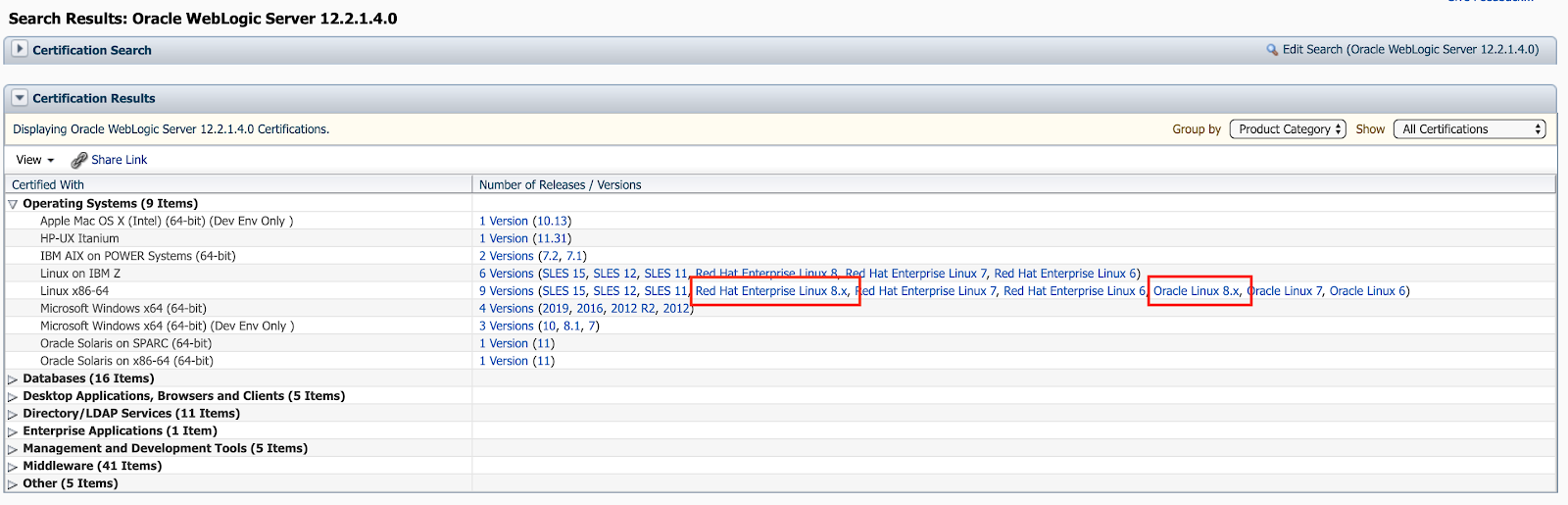
Oracle Fusion Middleware 12.2.1.4.0 certified with Linux 8

Currently Oracle certified the Oracle Fusion Middleware 12.2.1.4.0 Components for the use of Linux 8, which includes the Oracle Linux 8 and the Red Hat Enterprise Linux 8.

You can find the newly added certifications in My Oracle Support (https://support.oracle.com) under the tab Certifications:

Oracle WebLogic 12.2.1.4.0 Certification:


Oracle Forms & Reports 12.2.1.4.0 Certification:


Oracle SOA Suite 12.2.1.4.0 Certification:


Moreover you can find the corresponding Oracle Fusion Middleware 12c Certifications under https://www.oracle.com/middleware/technologies/fusion-certification.html and there the Excel Sheet https://www.oracle.com/technetwork/middleware/fmw-122140-certmatrix-5763476.xlsx which contains the newly added certification for Linux 8 (Oracle Linux 8 and Red Hat Enterprise Linux 8).

Under the "Oracle Fusion Middleware System Requirements and Specifications" documentation for 12.2.1.4.0 in the section "Linux Operating System Requirements" (https://docs.oracle.com/en/middleware/fusion-middleware/12.2.1.4/sysrs/system-requirements-and-specifications.html#GUID-37C51062-3732-4A4B-8E0E-003D9DFC8C26) you can find all required packages to be installed.
Take note that 2 of them are EL7 packages (compat-libcap1-1.10-7.el7.x86_64 and compat-libstdc++-33-3.2.3-72.el7.x86_64), which are not longer present in the Linux 8 distributions, so when you install your Fusion Middleware 12.2.1.4.0 components just ignore the warnings/failure for the 2 EL7 packages by using the Skip button in the graphical installer.


Monday, March 2, 2020

Generating Prometheus Metrics directly from your Oracle Database

Prometheus (https://prometheus.io/) is getting more and more common as a Monitoring Solution, many products are offering out-of-box Prometheus formatted metrics (e.g WildFly, Spring Boot and so on). Even Oracle is providing for the Oracle WebLogic Server a weblogic-monitoring-exporter, which is generating Prometheus formatted metrics (see https://github.com/oracle/weblogic-monitoring-exporter and checkout my previous blog post "WebLogic Monitoring with Prometheus and Grafana" https://dirknachbar.blogspot.com/2020/02/weblogic-monitoring-with-prometheus-and.html).

Many people are using Oracle Enterprise Manager for Oracle Database Monitoring, which makes sense if you have a certain environment size, but for some small environments, e.g. you have a couple of database, Oracle Enterprise Manager might be an overkill. On top, if you are running your Oracle Database in Docker, you might want to have an agent-less and lightweight monitoring alternative.

So why not to use Prometheus? The problem is, Oracle is not providing Prometheus formatted metrics for the Oracle Database :-( but with a little bit of PL/SQL and Oracle REST Data Services (ORDS) you can get Prometheus formatted metrics out of your Oracle Database and you can define which metrics you want to get.

The first step is to create a procedure which will collect your Prometheus formatted metrics, for this I am simply using the good old PL/SQL Webtool Kit. In my case I will create the procedure under the Oracle Database User dbsnmp, as this user got already the required permissions on the various v$ and dba_% views.

The basic concept is really simply, at first define all the cursors you will need for collecting your required metrics, e.g. "c_process is SELECT COUNT(*) as count FROM v$process;" and later you will loop over the cursor and generate a output with htp.print. That's all ...

Below is an example, which you can use as starting point to collect your metrics and you can easily add your own required metrics or remove them.

create or replace NONEDITIONABLE procedure prometheus_metrics IS
-- =======================================================================
-- Procedure prometheus_metrics
-- Purpose: Generating Prometheus formatted metrics from the Oracle DB
--
-- Author: Dirk Nachbar, https://dirknachbar.blogspot.com
--
-- =======================================================================
--
   cursor c_processes is
          SELECT COUNT(*) as count FROM v$process;
   --
   cursor c_sessions is
          SELECT status, type, COUNT(*) as value FROM v$session GROUP BY status, type;
   --
   cursor c_activities is
          SELECT name, value FROM v$sysstat WHERE name IN ('parse count (total)', 'execute count', 'user commits', 'user rollbacks');
   --
   cursor c_version is
          select 'Oracle' as oracle, substr(version_full, 1,2)||'.'|| substr(version_full, 4,1) as value from v$instance;
   --
   cursor c_tablespaces is
            SELECT
    Z.name       as tablespace,
    dt.contents  as type,
    Z.bytes      as bytes,
    Z.max_bytes  as max_bytes,
    Z.free_bytes as free
  FROM
  (
    SELECT
      X.name                   as name,
      SUM(nvl(X.free_bytes,0)) as free_bytes,
      SUM(X.bytes)             as bytes,
      SUM(X.max_bytes)         as max_bytes
    FROM
      (
        SELECT
          ddf.tablespace_name as name,
          ddf.status as status,
          ddf.bytes as bytes,
          sum(coalesce(dfs.bytes, 0)) as free_bytes,
          CASE
            WHEN ddf.maxbytes = 0 THEN ddf.bytes
            ELSE ddf.maxbytes
          END as max_bytes
        FROM
          sys.dba_data_files ddf,
          sys.dba_tablespaces dt,
          sys.dba_free_space dfs
        WHERE ddf.tablespace_name = dt.tablespace_name
        AND ddf.file_id = dfs.file_id(+)
        GROUP BY
          ddf.tablespace_name,
          ddf.file_name,
          ddf.status,
          ddf.bytes,
          ddf.maxbytes
      ) X
    GROUP BY X.name
    UNION ALL
    SELECT
      Y.name                   as name,
      MAX(nvl(Y.free_bytes,0)) as free_bytes,
      SUM(Y.bytes)             as bytes,
      SUM(Y.max_bytes)         as max_bytes
    FROM
      (
        SELECT
          dtf.tablespace_name as name,
          dtf.status as status,
          dtf.bytes as bytes,
          (
            SELECT
              ((f.total_blocks - s.tot_used_blocks)*vp.value)
            FROM
              (SELECT tablespace_name, sum(used_blocks) tot_used_blocks FROM gv$sort_segment WHERE  tablespace_name!='DUMMY' GROUP BY tablespace_name) s,
              (SELECT tablespace_name, sum(blocks) total_blocks FROM dba_temp_files where tablespace_name !='DUMMY' GROUP BY tablespace_name) f,
              (SELECT value FROM v$parameter WHERE name = 'db_block_size') vp
            WHERE f.tablespace_name=s.tablespace_name AND f.tablespace_name = dtf.tablespace_name
          ) as free_bytes,
          CASE
            WHEN dtf.maxbytes = 0 THEN dtf.bytes
            ELSE dtf.maxbytes
          END as max_bytes
        FROM
          sys.dba_temp_files dtf
      ) Y
    GROUP BY Y.name
  ) Z, sys.dba_tablespaces dt
  WHERE
    Z.name = dt.tablespace_name;
    --   
    cursor c_locked_accounts is
           select username, case when account_status like '%LOCKED%' then '1' else '0' END value from dba_users where username in ('SYSTEM', 'SYS', 'DEMO');
    --
    cursor c_top_sessions is
           SELECT a.username as username, a.sid, a.machine as machine, a.program as program, Trunc(b.value/1024) as memorykb
           FROM   v$session a,
                  v$sesstat b,
                  v$statname c
           WHERE  a.sid = b.sid
           AND    a.username is not null
           AND    b.statistic# = c.statistic#
           AND    c.name = 'session pga memory'
           AND    a.program IS NOT NULL
           AND    rownum <= 10
           ORDER BY b.value DESC;
     --
     cursor c_fileio is
            SELECT ddf.tablespace_name as tablespace_name, d.name as filename, f.phyblkrd as blocksread, f.phyblkwrt as blockswriten, f.phyblkrd + f.phyblkwrt as totalio FROM v$filestat f, v$datafile d, dba_data_files ddf WHERE  d.file# = f.file# and ddf.file_id = d.file# ORDER BY f.phyblkrd + f.phyblkwrt DESC;
     --
     cursor c_sga_info is
            SELECT decode(name, 'Fixed SGA Size','FixedSGASize','Redo Buffers','RedoBuffers','Buffer Cache Size','BufferCacheSize','In-Memory Area Size','InMemoryAreaSize','Shared Pool Size','SharedPoolSize','Large Pool Size','LargePoolSize','Java Pool Size','JavaPoolSize','Streams Pool Size','StreamsPoolSize','Shared IO Pool Size','SharedIOPoolSize','Data Transfer Cache Size','DataTransferCacheSize','Granule Size','GranuleSize','Maximum SGA Size','MaximumSGASize','Startup overhead in Shared Pool','StartupOverheadInSharedPool','Free SGA Memory Available','FreeSGAMemoryAvailable') name,
                   bytes as value 
            FROM v$sgainfo;
     --
     cursor c_db_status is
            SELECT instance_name as name, decode(status, 'STARTED', 0, 'MOUNTED', 1, 'OPEN', 2, 'OPEMN MIGRATE', 3) as value
            FROM v$instance;
     --
     cursor c_archiver_status is
            SELECT instance_name as name, decode(archiver, 'STOPPED', 0, 'STARTED', 1, 'FAILED', 2) as value
            FROM v$instance;

--
begin
owa.num_cgi_vars := 0;
htp.init();
--
-- Oracle Version
--
    htp.print('# HELP oracle_version Oracle DB Version Number');
    htp.print('# TYPE oracle_version counter');
    for rec_version in c_version loop
        htp.print('oracle_version ' || rec_version.value);
    end loop;

--
-- Oracle Processes
--
    htp.print('# HELP oracle_processes Current Number of processes');
    htp.print('# TYPE oracle_processes counter');
    for rec_processes in c_processes loop
        htp.print('oracle_processes ' || rec_processes.count);
    end loop;
--
-- Oracle Sessions
--
    htp.print('# HELP oracle_sessions Current Number of sessions');
    htp.print('# TYPE oracle_sessions counter');
    for rec_sessions in c_sessions loop
        htp.print('oracle_sessions{status="'||rec_sessions.status||'",type="'||rec_sessions.type||'"} ' || rec_sessions.value);
    end loop;
--
-- Oracle Activities
--
    htp.print('# HELP oracle_activity Metrics from v$sysstat');
    htp.print('# TYPE oracle_activity counter');
    for rec_activities in c_activities loop
        htp.print('oracle_activities{name="'||rec_activities.name||'"} ' || rec_activities.value);
    end loop;
--
-- Oracle Tablespaces
--
    -- bytes
    htp.print('# HELP oracle_tablespace_bytes Generic counter metric of tablespace bytes in Oracle DB');
    htp.print('# TYPE oracle_tablespace_bytes gauge');
    for rec_tablespaces in c_tablespaces loop
        htp.print('oracle_tablespace_bytes{tablespace="'||rec_tablespaces.tablespace||'",type="'||rec_tablespaces.type||'"} ' || rec_tablespaces.bytes);
    end loop;
    -- free bytes
    htp.print('# HELP oracle_tablespace_free Generic counter metric of tablespace free bytes in Oracle DB');
    htp.print('# TYPE oracle_tablespace_free gauge');
    for rec_tablespaces in c_tablespaces loop
        htp.print('oracle_tablespace_bytes_free{tablespace="'||rec_tablespaces.tablespace||'",type="'||rec_tablespaces.type||'"} ' || rec_tablespaces.free);
    end loop;
    -- max bytes
    htp.print('# HELP oracle_tablespace_max_bytes Generic counter metric of tablespace max bytes in Oracle DB');
    htp.print('# TYPE oracle_tablespace_max_bytes gauge');
    for rec_tablespaces in c_tablespaces loop
        htp.print('oracle_tablespace_max_bytes{tablespace="'||rec_tablespaces.tablespace||'",type="'||rec_tablespaces.type||'"} ' || rec_tablespaces.max_bytes);
    end loop;
--
-- Locked Accounts
--
    htp.print('# HELP oracle_locked_accounts Metrics from dba_users');
    htp.print('# TYPE oracle_locked_accounts counter');
    for rec_locked_accounts in c_locked_accounts loop
        htp.print('oracle_locked_accounts{username="'||rec_locked_accounts.username||'"} ' || rec_locked_accounts.value);
    end loop;
--
-- File IO
--
    htp.print('# HELP oracle_fileio Metrics from v$filestat, v$datafile');
    htp.print('# TYPE oracle_fileio counter');
    for rec_fileio in c_fileio loop
        htp.print('oracle_fileio{tablespace_name="'||rec_fileio.tablespace_name||'",filename="'||rec_fileio.filename||'",type="blocksread"} ' || rec_fileio.blocksread);
        htp.print('oracle_fileio{tablespace_name="'||rec_fileio.tablespace_name||'",filename="'||rec_fileio.filename||'",type="blockswriten"} ' || rec_fileio.blockswriten);
        htp.print('oracle_fileio{tablespace_name="'||rec_fileio.tablespace_name||'",filename="'||rec_fileio.filename||'",type="totalio"} ' || rec_fileio.totalio);
    end loop;
--
-- Top Sessions
--
    htp.print('# HELP oracle_top_sessions Metrics from v$session, v$sesstat, v$statname');
    htp.print('# TYPE oracle_top_sessions counter');
    for rec_top_sessions in c_top_sessions loop
        htp.print('oracle_top_sessions{username="'||rec_top_sessions.username||'",sid="'||rec_top_sessions.sid||'",program="'||rec_top_sessions.program||'"} ' || rec_top_sessions.memorykb);
    end loop;
--
-- SGA Info
--
    htp.print('# HELP oracle_sga_info Metrics from v$sgainfo');
    htp.print('# TYPE oracle_sga_info counter');
    for rec_sga_info in c_sga_info loop
        htp.print('oracle_sga_info{name="'||rec_sga_info.name||'"} ' || rec_sga_info.value);
    end loop;
--
-- DB Status
--
   htp.print('# HELP oracle_db_status from v$instance');
   htp.print('# TYPE oracle_db_status counter');
   for rec_db_status in c_db_status loop
       htp.print('oracle_db_status{name="'||rec_db_status.name||'"} ' || rec_db_status.value);
   end loop;
--
-- Archiver Status
--
   htp.print('# HELP oracle_archiver_status from v$instance');
   htp.print('# TYPE oracle_archiver_status counter');
   for rec_archiver_status in c_archiver_status loop
       htp.print('oracle_archiver_status{name="'||rec_archiver_status.name||'"} ' || rec_archiver_status.value);
   end loop;
end;
/
show err

To test, if the metrics are generated correctly enable the OWA Output in your SQL Developer and execute the above created procedures.


As next we have to setup the Oracle REST Data Services (ORDS). I am using as a showcase the ORDS 19.4 release and will do a setup in Standalone Mode, so with the integrated Jetty Server, you can also deploy your ords.war into a Tomcat or an Oracle WebLogic Server.

Download the ORDS 19.4 from Technical Resources from Oracle (former OTN) https://www.oracle.com/database/technologies/appdev/rest-data-services-downloads.html, transfer the zip file to your server and unzip it somewhere on your server, I am using /u00/app/oracle/product/ords-19.4 (so I am a bit OFA aligned).
Then you have to run the install process:

 #
[oracle@prometheus ords-19.4]$ cd /u00/app/oracle/product/ords-19.4
[oracle@prometheus ords-19.4]$ java -jar ords.war install advanced
This Oracle REST Data Services instance has not yet been configured.
Please complete the following prompts


Enter the location to store configuration data: .
Specify the database connection type to use.
# Choose Option 1 for a Basic Connection String
Enter number for [1] Basic  [2] TNS  [3] Custom URL [1]:1
# Provide the Servername of your Database Server Host
Enter the name of the database server [localhost]:prometheus
# Provide the Listener Port or confirm the default value with 1521
Enter the database listen port [1521]:
# If you are using Database Service Names, choose Option 1
Enter 1 to specify the database service name, or 2 to specify the database SID [1]:
# Provide the Database Service Name
Enter the database service name:DB193
# Choose Option 2
Enter 1 if you want to verify/install Oracle REST Data Services schema or 2 to skip this step [1]:2
# Confirm the default Option 1
Enter 1 if you want to use PL/SQL Gateway or 2 to skip this step.
If using Oracle Application Express or migrating from mod_plsql then you must enter 1 [1]:
# Provide the Database User, in my case dbsnmp
Enter the PL/SQL Gateway database user name [APEX_PUBLIC_USER]:dbsnmp
# Provide 2 times the password of the above provided Database User
Enter the database password for dbsnmp:
Confirm password:
# Choose Option 3
Enter a number to select a feature to enable [1] SQL Developer Web [2] REST Enabled SQL [3] None [1]:3
2020-03-02T08:33:12.149Z INFO   reloaded pools: []
# For showcases I am using the Standalone Mode, so choose Option 1
Enter 1 if you wish to start in standalone mode or 2 to exit [1]:
# Choose if you are using http or https, I choose 1 = http
Enter 1 if using HTTP or 2 if using HTTPS [1]:1
# Provide the http Port, in my case 7778
Enter the HTTP port [8080]:7778
2020-03-02 09:33:34.927:INFO::main: Logging initialized @84052ms to org.eclipse.jetty.util.log.StdErrLog
2020-03-02 09:33:34.967:INFO:oeju.TypeUtil:main: JVM Runtime does not support Modules
2020-03-02T08:33:35.017Z INFO   HTTP and HTTP/2 cleartext listening on host: localhost port: 7778
2020-03-02T08:33:35.039Z INFO   Disabling document root because the specified folder does not exist: /u00/app/oracle/product/ords-19.4/ords/standalone/doc_root
2020-03-02 09:33:35.342:INFO:oejs.Server:main: jetty-9.4.24.v20191120; built: 2019-11-22T11:09:44.612Z; git: 8b8c80157294e38f81ef8ea2358a0c49bf5db918; jvm 1.8.0_232-b09
2020-03-02 09:33:35.380:INFO:oejs.session:main: DefaultSessionIdManager workerName=node0
2020-03-02 09:33:35.380:INFO:oejs.session:main: No SessionScavenger set, using defaults
2020-03-02 09:33:35.381:INFO:oejs.session:main: node0 Scavenging every 660000ms
2020-03-02T08:33:36.218Z INFO   Configuration properties for: |apex||
db.connectionType=basic
db.hostname=prometheus
db.port=1521
db.servicename=DB193
db.password=******
db.username=dbsnmp
resource.templates.enabled=true

2020-03-02T08:33:36.222Z WARNING *** jdbc.MaxLimit in configuration |apex|| is using a value of 10, this setting may not be sized adequately for a production environment ***
2020-03-02T08:33:36.222Z WARNING *** jdbc.InitialLimit in configuration |apex|| is using a value of 3, this setting may not be sized adequately for a production environment ***
2020-03-02T08:33:37.045Z INFO   Oracle REST Data Services initialized
Oracle REST Data Services version : 19.4.0.r3521226
Oracle REST Data Services server info: jetty/9.4.24.v20191120

2020-03-02 09:33:37.524:INFO:oejsh.ContextHandler:main: Started o.e.j.s.ServletContextHandler@4470f8a6{/ords,null,AVAILABLE}
2020-03-02 09:33:37.535:INFO:oejs.AbstractConnector:main: Started ServerConnector@74eb909f{HTTP/1.1,[http/1.1, h2c]}{0.0.0.0:7778}
2020-03-02 09:33:37.535:INFO:oejs.Server:main: Started @86661ms

# Now hit Control-C to stop the Jetty Server

^C2020-03-02 09:36:07.794:INFO:oejs.AbstractConnector:Thread-1: Stopped ServerConnector@74eb909f{HTTP/1.1,[http/1.1, h2c]}{0.0.0.0:7778}
2020-03-02 09:36:07.795:INFO:oejs.session:Thread-1: node0 Stopped scavenging
2020-03-02 09:36:07.811:INFO:oejsh.ContextHandler:Thread-1: Stopped o.e.j.s.ServletContextHandler@4470f8a6{/ords,null,UNAVAILABLE}

After the Jetty Server is stopped, we can setup the Database Definition for our Prometheus Metrics.

 #
[oracle@prometheus ords-19.4]$ java -jar ords.war setup --database prometheus_metrics
Specify the database connection type to use.
# Choose Option 1 for a Basic Connection String
Enter number for [1] Basic  [2] TNS  [3] Custom URL [1]:1
# Provide the Servername of your Database Server Host
Enter the name of the database server [localhost]:prometheus
# Provide the Listener Port or confirm the default value with 1521
Enter the database listen port [1521]:
# If you are using Database Service Names, choose Option 1
Enter 1 to specify the database service name, or 2 to specify the database SID [1]:
# Provide the Database Service Name
Enter the database service name:DB193
# Choose Option 2
Enter 1 if you want to verify/install Oracle REST Data Services schema or 2 to skip this step [1]:2
# Confirm the default Option 1
Enter 1 if you want to use PL/SQL Gateway or 2 to skip this step.
If using Oracle Application Express or migrating from mod_plsql then you must enter 1 [1]:
# Provide the Database User, in my case dbsnmp
Enter the PL/SQL Gateway database user name [APEX_PUBLIC_USER]:dbsnmp
# Provide 2 times the password of the above provided Database User
Enter the database password for dbsnmp:
Confirm password:
# Choose Option 3
Enter a number to select a feature to enable [1] SQL Developer Web [2] REST Enabled SQL [3] None [1]:3
2020-03-02T08:37:46.632Z INFO   reloaded pools: [|apex||, |prometheus_metrics||]

As next we need to define the mapped URL for the above created Database Definition

 #
[oracle@prometheus ords-19.4]$ java -jar ords.war map-url --type base-path /prometheus_metrics prometheus_metrics
2020-03-02T08:38:32.462Z INFO   Creating new mapping from: [base-path,/prometheus_metrics] to map to: [prometheus_metrics, null, null]

Finally we can startup the ords.war in standalone mode

 #
[oracle@prometheus ords-19.4]$ java -jar ords.war standalone
2020-03-02 09:38:43.552:INFO::main: Logging initialized @1525ms to org.eclipse.jetty.util.log.StdErrLog
2020-03-02 09:38:43.595:INFO:oeju.TypeUtil:main: JVM Runtime does not support Modules
2020-03-02T08:38:43.652Z INFO   HTTP and HTTP/2 cleartext listening on host: localhost port: 7778
2020-03-02T08:38:43.682Z INFO   Disabling document root because the specified folder does not exist: /u00/app/oracle/product/ords-19.4/ords/standalone/doc_root
2020-03-02 09:38:44.283:INFO:oejs.Server:main: jetty-9.4.24.v20191120; built: 2019-11-22T11:09:44.612Z; git: 8b8c80157294e38f81ef8ea2358a0c49bf5db918; jvm 1.8.0_232-b09
2020-03-02 09:38:44.330:INFO:oejs.session:main: DefaultSessionIdManager workerName=node0
2020-03-02 09:38:44.330:INFO:oejs.session:main: No SessionScavenger set, using defaults
2020-03-02 09:38:44.331:INFO:oejs.session:main: node0 Scavenging every 600000ms
2020-03-02T08:38:45.500Z INFO   Configuration properties for: |apex||
db.connectionType=basic
db.hostname=prometheus
db.port=1521
db.servicename=DB193
db.password=******
db.username=dbsnmp
resource.templates.enabled=true

2020-03-02T08:38:45.507Z WARNING *** jdbc.MaxLimit in configuration |apex|| is using a value of 10, this setting may not be sized adequately for a production environment ***
2020-03-02T08:38:45.507Z WARNING *** jdbc.InitialLimit in configuration |apex|| is using a value of 3, this setting may not be sized adequately for a production environment ***
2020-03-02T08:38:46.221Z INFO   Configuration properties for: |prometheus_metrics||
db.connectionType=basic
db.hostname=prometheus
db.port=1521
db.servicename=DB193
db.password=******
db.username=dbsnmp
resource.templates.enabled=true

2020-03-02T08:38:46.221Z WARNING *** jdbc.MaxLimit in configuration |prometheus_metrics|| is using a value of 10, this setting may not be sized adequately for a production environment ***
2020-03-02T08:38:46.221Z WARNING *** jdbc.InitialLimit in configuration |prometheus_metrics|| is using a value of 3, this setting may not be sized adequately for a production environment ***
2020-03-02T08:38:46.594Z INFO   Oracle REST Data Services initialized
Oracle REST Data Services version : 19.4.0.r3521226
Oracle REST Data Services server info: jetty/9.4.24.v20191120

2020-03-02 09:38:47.093:INFO:oejsh.ContextHandler:main: Started o.e.j.s.ServletContextHandler@47db50c5{/ords,null,AVAILABLE}
2020-03-02 09:38:47.103:INFO:oejs.AbstractConnector:main: Started ServerConnector@2438dcd{HTTP/1.1,[http/1.1, h2c]}{0.0.0.0:7778}
2020-03-02 09:38:47.103:INFO:oejs.Server:main: Started @5078ms

Just to test, open a browser and point to http://<servername>:<Jetty Port>/ords/prometheus_metrics/PROMETHEUS_METRICS and you show see as follows:


The final step is to add in your Prometheus Configuration File prometheus.yml under the scrape_configs section a job_name for the Prometheus formatted metrics out of your Oracle Database

 
. . .
scrape_configs:
. . .
# Align the IP address and Ports for the targets with your settings
  - job_name: 'oracle_db'
    scrape_interval: 10s
    scrape_timeout: 5s
    metrics_path: /ords/prometheus_metrics/PROMETHEUS_METRICS
    static_configs:
      - targets: ['172.17.0.1:7778']
. . .

Restart your Prometheus Server and check the status of the new target in the Prometheus Console


Under the Graph section in the Prometheus Console you can find your defined metrics from the Oracle Database


Finally you can create in your Grafana a Dashboard to reflect your Oracle Metrics:


As you can see, with a little bit of work, you can collect from your Oracle Database with really easy methods Prometheus formatted metrics, push them into your Prometheus system and build a nice dashboard with Grafana. You can even setup thresholds for your Oracle Database metrics and generate alerts either using the Prometheus Alertmanager or trigger the alerts via Grafana.


Friday, February 28, 2020

Weblogic Monitoring with Prometheus and Grafana

Since quite some time Oracle is providing in their GitHub Repository the weblogic-monitoring-exporter https://github.com/oracle/weblogic-monitoring-exporter.

This weblogic-monitoring-exporter is basically a war file, which uses the WebLogic Server RESTful Management API to collect defined metrics of your WebLogic Server and exports them in a Prometheus compatible format.

At first you will need to download the get[Version-Number].sh from the GitHub Repository https://github.com/oracle/weblogic-monitoring-exporter/releases. Next step is to create a YAML file in which you define which metrics you want to collect from your WebLogic Server.
Place both files in one directory and execute the get[Version-Number].sh with your YAML file as input parameter. The get[Version-Number].sh will simple download from GitHub the required war file, so make sure that your system on which you execute the script got internet connection, and merge your YAML file into the war file.

Example YAML file named exporter-config.yml

metricsNameSnakeCase: true
queries:
- key: name
  keyName: location
  prefix: wls_server_
  applicationRuntimes:
    key: name
    keyName: app
    componentRuntimes:
      prefix: wls_webapp_config_
      type: WebAppComponentRuntime
      key: name
      values: [deploymentState, contextRoot, sourceInfo, sessionsOpenedTotalCount, openSessionsCurrentCount, openSessionsHighCount]
      servlets:
        prefix: wls_servlet_
        key: servletName
- JVMRuntime:
    prefix: wls_jvm_
    key: name
- executeQueueRuntimes:
    prefix: wls_socketmuxer_
    key: name
    values: [pendingRequestCurrentCount]
- workManagerRuntimes:
    prefix: wls_workmanager_
    key: name
    values: [stuckThreadCount, pendingRequests, completedRequests]
- threadPoolRuntime:
    prefix: wls_threadpool_
    key: name
    values: [executeThreadTotalCount, queueLength, stuckThreadCount, hoggingThreadCount]
- JMSRuntime:
    key: name
    keyName: jmsruntime
    prefix: wls_jmsruntime_
    JMSServers:
      prefix: wls_jms_
      key: name
      keyName: jmsserver
      destinations:
        prefix: wls_jms_dest_
        key: name
        keyName: destination

- persistentStoreRuntimes:
    prefix: wls_persistentstore_
    key: name
- JDBCServiceRuntime:
    JDBCDataSourceRuntimeMBeans:
      prefix: wls_datasource_
      key: name
- JTARuntime:
    prefix: wls_jta_
    key: name


Now let's merge the exporter-config.yml into the wls-exporter.war

 #
./get1.1.1.sh exporter-config.yml 
  % Total    % Received % Xferd  Average Speed   Time    Time     Time  Current
                                 Dload  Upload   Total   Spent    Left  Speed
100   607  100   607    0     0   2872      0 --:--:-- --:--:-- --:--:--  2876
100 2018k  100 2018k    0     0  1165k      0  0:00:01  0:00:01 --:--:-- 2247k
created /tmp/ci-21tVFvZiR4
/tmp/ci-21tVFvZiR4 /u00/app/oracle/install
in temp dir
  adding: config.yml (deflated 64%)
/u00/app/oracle/install

As next we can deploy the generated wls-exporter.war on your WebLogic Server, just connect with a browser to your WebLogic Console (http://<servername>:<AdminServerPort>/console)

Navigate under the Domain Structure to the Option Deployments, click the "Lock & Edit" button in the Change Center, if you are running your WebLogic Domain in Production Mode and click the "Install" button under the Configuration tab in the Deployments.


Now navigate to the location of the wls-exporter.war file and select it and hit the button "Next"


Make sure that the option "Install this deployment as an application" is marked and hit the button "Next"


Target the deployment of the wls-exporter.war to your Servers and hit the button "Next"


Leave the default and hit the button "Next"


Leave the default and hit the button "Next"


Click the button "Save" and finally click the button "Activate Changes" in the Change Center


After the successful activation you should see as follows


Now we are done with the deployment of the wls-exporter.war and we can start the application, just go to the tab "Control" and click under "Start" the option "Servicing all requests"


Confirm the startup of the application with "Yes"


After that you should see under the Control tab that the wls-exporter application is now in state Active


The next step is to configure your Prometheus environment to collect the metrics from the wls-exporter application. Just add under the scrape_configs section in your prometheus.yml configuration file the necessary entries for the WebLogic Servers.
Simply add under the scrape_config section in the prometheus.yml a job_name for each WebLogic Managed Server (including your AdminServer). If you are adding multiple WebLogic Servers, its advisable to use the metric_relabel_configs option, to prefix each metric collected by Prometheus with for example the name of the WebLogic Server:

 
# Align the job_name with your settings
# Align the IP address and Ports for the targets with your settings
# Align the metric_relabel_configs with your settings

global:
  scrape_interval:     15s
  evaluation_interval: 15s
  scrape_timeout: 10s
. . .
. . .
scrape_configs:
. . .
. . .
  - job_name: 'WebLogicAdminServer'
    scrape_interval: 10s
    metrics_path: /wls-exporter/metrics
    static_configs:
      - targets: ['172.17.0.1:7001']
    basic_auth:
       username: weblogic
       password: Oracle12c
    metric_relabel_configs:
      - source_labels: [__name__]
        target_label: __name__
        replacement: "DemoAdminServer_${1}"

  - job_name: 'WebLogicDEMOMS1'
    scrape_interval: 10s
    metrics_path: /wls-exporter/metrics
    static_configs:
      - targets: ['172.17.0.1:7003']
    basic_auth:
       username: weblogic
       password: Oracle12c
    metric_relabel_configs:
      - source_labels: [__name__]
        target_label: __name__
        replacement: "DEMOMS1_${1}"

  - job_name: 'WebLogicDEMOMS2'
    scrape_interval: 10s
    metrics_path: /wls-exporter/metrics
    static_configs:
      - targets: ['172.17.0.1:7004']
    basic_auth:
       username: weblogic
       password: Oracle12c
    metric_relabel_configs:
      - source_labels: [__name__]
        target_label: __name__
        replacement: "DEMOMS2_${1}"
. . .
. . .

fter this changes, just restart your Prometheus and check under the Prometheus Console - Targets the status of your job_name.


You can see that we have now 3 Endpoints, one for each WebLogic Server (one AdminServer and two Managed Servers).

Under the Prometheus Console - Graph you can see all your defined metrics for your WebLogic Servers.


As next you can create a Dashboard in your Grafana environment.


So with a little bit of work you can easily monitor your WebLogic Environment with Prometheus and Grafana. In addition you can configure thresholds for your metrics and trigger alerts either via the alertmanager from Prometheus or via Grafana.

One point you should take care of with the weblogic-monitoring-exporter is the usage of the configuration option "domainQualifier: true". As documented this configuration is the metrics with the domain name, but currently the option "domainQualifier: true" will cause a non-Prometheus-conform formatted metric.

name{domain="demo_domain"} demo_domain
DemoAdminServer_wls_server_activation_time{domain="demo_domain",location="DemoAdminServer"} 1581419617765
DemoAdminServer_wls_server_admin_server_listen_port{domain="demo_domain",location="DemoAdminServer"} 7001
DemoAdminServer_wls_server_open_sockets_current_count{domain="demo_domain",location="DemoAdminServer"} 4
DemoAdminServer_wls_server_state_val{domain="demo_domain",location="DemoAdminServer"} 2

As you can see from above listing, the wls-exporter is generating the first line wrong, as the metric value is a string and therefor it can not be parsed by Prometheus.

I have currently opened an issue in the GitHub Repository for the weblogic-monitoring-exporter and I hope to get soon a feedback and/or solution https://github.com/oracle/weblogic-monitoring-exporter/issues/82

But nevertheless, the weblogic-monitoring-exporter is a great add-on for the Oracle WebLogic Server in order to monitor your environment with Prometheus and visualise your metrics with Grafana.

UPDATE 2nd April 2020: the above mentioned problem with the non-conform Prometheus formatted metric is resolved by the Oracle Development Team for the WebLogic-Monitoring-Exporter, just get the release 1.1.2 (https://github.com/oracle/weblogic-monitoring-exporter/releases)


Thursday, February 20, 2020

Cleanup Oracle Fusion Middleware 12c Repository manually

Currently I was cleaning up some of my Oracle Fusion Middleware Forms & Reports test and demo environments manually and wanted to setup them freshly.

As I was lazy, I didn't used the RCU (Repository Creation Utility) for the cleanup, I just did a manual drop user and drop tablespace and cleaned up my $DOMAIN_HOME.

In my case it was a Forms & Reports environment with the Prefix FR12213, so I manually dropped all the Repository Users starting with FR12213 and the corresponding tablespaces.

#
sqlplus / as sysdba

SQL> drop user FR12213_OPSS cascade;
SQL> drop user FR12213_STB cascade;
SQL> drop user FR12213_MDS cascade;
SQL> drop user FR12213_IAU_APPEND cascade;
SQL> drop user FR12213_IAU_VIEWER cascade;
SQL> drop user FR12213_IAU cascade;
SQL> drop user FR12213_WLS_RUNTIME cascade;
SQL> drop user FR12213_WLS cascade;
SQL> drop user FR12213_UMS cascade;

SQL> drop tablespace FR12213_IAS_OPSS including content and datafiles;
SQL> drop tablespace FR12213_IAS_TEMP including content and datafiles;
SQL> drop tablespace FR12213_IAS_UMS including content and datafiles;
SQL> drop tablespace FR12213_IAU including content and datafiles;
SQL> drop tablespace FR12213_MDS including content and datafiles;
SQL> drop tablespace FR12213_STB including content and datafiles;
SQL> drop tablespace FR12213_WLS including content and datafiles;

After that I simply cleaned up the $DOMAIN_HOME and wanted to create the complete WebLogic Domain again including the run of the RCU, everything in silent mode.

While running the RCU following error came up:

#
Processing command line ....
Repository Creation Utility - Checking Prerequisites
Checking Global Prerequisites

ERROR - RCU-6016 Invalid prefix specified.
CAUSE - RCU-6016 The specified prefix already exists.
ACTION - RCU-6016 Specify another prefix.

ERROR - RCU-6091 Component validation failed.
CAUSE - RCU-6091 One or more component specific validation failed.
ACTION - RCU-6091 Check log for more details and fix the validation error.

After a bit of searching around and think, I came to the table SYSTEM.SCHEMA_VERSION_REGISTRY$

#
sqlplus / as sysdba
SQL> select distinct(MRC_NAME) from SYSTEM.SCHEMA_VERSION_REGISTRY$;

MRC_NAME
------------------------------
FR12213

SQL> delete from SYSTEM.SCHEMA_VERSION_REGISTRY$ where MRC_NAME = 'FR12213';
SQL> commit;

After deleting the corresponding rows in the SYSTEM.SCHEMA_VERSION_REGISTRY$ table, the silent execution of the RCU was running without any errors.
So don't forget to cleanup the SYSTEM.SCHEMA_VERSION_REGISTRY$ if you are performing a manual cleanup :-)

The above concept applies to any Oracle Fusion Middleware Component which is using Repository Users created by the RCU (SOA Suite, Forms & Reports and so on)


Friday, February 14, 2020

Oracle 20c Documentation available

Since a few hours the Oracle Database 20c documentation is online.

https://docs.oracle.com/en/database/oracle/oracle-database/20/books.html

There are quite some interesting new features/changes in the new upcoming Oracle 20c release.

The complete list of new features you can find under: https://docs.oracle.com/en/database/oracle/oracle-database/20/newft/new-features.html

One of the most interesting new feature/change is, that from Oracle 20c going, the only supported architecture is only Multitenant.


Enjoy reading the new features :-)


Thursday, February 6, 2020

Huge Number of component_event.xlf* and pki_data*.tmp files in /tmp in Oracle Forms & Reports 12c

If you are running an Oracle Forms and Reports 12c (12.2.1.+) environment over quite some time, you might discover that under the /tmp directory are a quite huge number of files named component_event.xlf* and pki_data*.tmp are generated and filling up your /tmp space.

The pki_data*.tmp files are usually 0 Bytes, but the component_event.xlf* files are between some Bytes up to some 100 Bytes. Over some time, these files are really fill up your /tmp.

These files are generated by the Oracle Platform Security for Java component and they are holding temporarily cache data.

In order to get rid of the component_event.xlf* files, you will just to have modify two configuration files of your WebLogic Domain.

In the configuration file $DOMAIN_HOME/config/fmwconfig/jps-config.xml find the following line and comment this line out.

#
# Original line
<serviceInstanceRef ref="audit.db"/>

# Modified line
<!-- serviceInstanceRef ref="audit.db"/ -->

The second configuration file is the $DOMAIN_HOME/config/fmwconfig/jps-config-jse.xml. Find the following line and comment this line out.

#
# Original line
<serviceInstanceRef ref="audit.db"/>

# Modified line
<!-- serviceInstanceRef ref="audit.db"/ -->

After the above modifications are done, you will have to restart your WebLogic Domain and you can see that no more component_event.xlf* are generated.
There are just the pki_data*.tmp files, but these files are usually 0 Bytes. For this files you can use a normal housekeeping job to clean them up regulary.


Monday, February 3, 2020

Patching Oracle WebLogic Server 12.2.1.4.0 Slim Edition

In my last blog I was showing how to install the new Oracle WebLogic Server 12.2.1.4.0 Slim Installer (https://dirknachbar.blogspot.com/2020/02/oracle-weblogic-server-122140-slim.html), now let's see how the minimised Oracle WebLogic Server 12.2.1.4.0 Slim Edition will handle a patching.

For this I will use the Oracle WLS PATCH SET UPDATE 12.2.1.4.191220 (Patch No. 30689820).

Login as oracle User to your server hosting the Oracle WebLogic Server 12.2.1.4.0 Slim Installation. Transfer the above mentioned Patch to your server and extract the zip file:

#
# set the necessary environment variables
[oracle@wlstest] export ORACLE_HOME=/u00/app/oracle/product/fmw-wls-slim-12.2.1.4.0
# switch to the extracted patch directory
[oracle@wlstest] cd /u00/app/oracle/patches/30689820
# Lets check the current patch status
[oracle@wlstest] $ORACLE_HOME/OPatch/opatch lsinventory
Oracle Interim Patch Installer version 13.9.4.2.1
Copyright (c) 2020, Oracle Corporation.  All rights reserved.


Oracle Home       : /u00/app/oracle/product/fmw-wls-slim-12.2.1.4.0
Central Inventory : /u00/app/oracle/oraInventory
   from           : /u00/app/oracle/product/fmw-wls-slim-12.2.1.4.0/oraInst.loc
OPatch version    : 13.9.4.2.1
OUI version       : 13.9.4.0.0
Log file location : /u00/app/oracle/product/fmw-wls-slim-12.2.1.4.0/cfgtoollogs/opatch/opatch2020-02-03_14-02-27PM_1.log


OPatch detects the Middleware Home as "/u00/app/oracle/product/fmw-wls-slim-12.2.1.4.0"

Lsinventory Output file location : /u00/app/oracle/product/fmw-wls-slim-12.2.1.4.0/cfgtoollogs/opatch/lsinv/lsinventory2020-02-03_14-02-27PM.txt

--------------------------------------------------------------------------------
Local Machine Information::
Hostname: wlstest.oracle-stuff.com
ARU platform id: 226
ARU platform description:: Linux x86-64


There are no Interim patches installed in this Oracle Home.


--------------------------------------------------------------------------------

OPatch succeeded.

As you can see, no patches so far installed on my fresh WebLogic Server 12.2.1.4.0 Slim Edition, now let's install the WLS PATCH SET UPDATE

#
# set the necessary environment variables
[oracle@wlstest] export ORACLE_HOME=/u00/app/oracle/product/fmw-wls-slim-12.2.1.4.0
# switch to the extracted patch directory
[oracle@wlstest] cd /u00/app/oracle/patches/30689820
[oracle@wlstest] $ORACLE_HOME/OPatch/opatch apply
Oracle Interim Patch Installer version 13.9.4.2.1
Copyright (c) 2020, Oracle Corporation.  All rights reserved.


Oracle Home       : /u00/app/oracle/product/fmw-wls-slim-12.2.1.4.0
Central Inventory : /u00/app/oracle/oraInventory
   from           : /u00/app/oracle/product/fmw-wls-slim-12.2.1.4.0/oraInst.loc
OPatch version    : 13.9.4.2.1
OUI version       : 13.9.4.0.0
Log file location : /u00/app/oracle/product/fmw-wls-slim-12.2.1.4.0/cfgtoollogs/opatch/opatch2020-02-03_14-02-41PM_1.log


OPatch detects the Middleware Home as "/u00/app/oracle/product/fmw-wls-slim-12.2.1.4.0"

Verifying environment and performing prerequisite checks...
OPatch continues with these patches:   30689820  

Do you want to proceed? [y|n]
y
User Responded with: Y
All checks passed.

Please shutdown Oracle instances running out of this ORACLE_HOME on the local system.
(Oracle Home = '/u00/app/oracle/product/fmw-wls-slim-12.2.1.4.0')


Is the local system ready for patching? [y|n]
y
User Responded with: Y
Backing up files...
Applying interim patch '30689820' to OH '/u00/app/oracle/product/fmw-wls-slim-12.2.1.4.0'
ApplySession: Optional component(s) [ oracle.wls.admin.console.en, 12.2.1.4.0 ] , [ oracle.wls.admin.console.en, 12.2.1.4.0 ]  not present in the Oracle Home or a higher version is found.

Patching component oracle.wls.libraries, 12.2.1.4.0...

Patching component oracle.wls.core.app.server, 12.2.1.4.0...
Patch 30689820 successfully applied.
Log file location: /u00/app/oracle/product/fmw-wls-slim-12.2.1.4.0/cfgtoollogs/opatch/opatch2020-02-03_14-02-41PM_1.log

OPatch succeeded.


# Let's verify the patch apply

[oracle@wlstest] $ORACLE_HOME/OPatch/opatch lsinventory
Oracle Interim Patch Installer version 13.9.4.2.1
Copyright (c) 2020, Oracle Corporation.  All rights reserved.


Oracle Home       : /u00/app/oracle/product/fmw-wls-slim-12.2.1.4.0
Central Inventory : /u00/app/oracle/oraInventory
   from           : /u00/app/oracle/product/fmw-wls-slim-12.2.1.4.0/oraInst.loc
OPatch version    : 13.9.4.2.1
OUI version       : 13.9.4.0.0
Log file location : /u00/app/oracle/product/fmw-wls-slim-12.2.1.4.0/cfgtoollogs/opatch/opatch2020-02-03_14-03-05PM_1.log


OPatch detects the Middleware Home as "/u00/app/oracle/product/fmw-wls-slim-12.2.1.4.0"

Lsinventory Output file location : /u00/app/oracle/product/fmw-wls-slim-12.2.1.4.0/cfgtoollogs/opatch/lsinv/lsinventory2020-02-03_14-03-05PM.txt

--------------------------------------------------------------------------------
Local Machine Information::
Hostname: wlstest.oracle-stuff.com
ARU platform id: 226
ARU platform description:: Linux x86-64


Interim patches (1) :

Patch  30689820     : applied on Mon Feb 03 14:02:57 CET 2020
Unique Patch ID:  23281789
Patch description:  "WLS PATCH SET UPDATE 12.2.1.4.191220"
   Created on 20 Dec 2019, 17:56:29 hrs PST8PDT
   Bugs fixed:
     26444945, 29671344, 29769772, 30067299, 30153412, 30230430, 30341541
     30342923, 30362026, 30362086, 30589563


--------------------------------------------------------------------------------

OPatch succeeded.


You can see, that the Patch apply went through without any problems, only the Patch apply prints you out some informations, that the to be patched component "oracle.wls.admin.console.en" is not present in the target ORACLE_HOME:

Optional component(s) [ oracle.wls.admin.console.en, 12.2.1.4.0 ] , [ oracle.wls.admin.console.en, 12.2.1.4.0 ]  not present in the Oracle Home or a higher version is found.

Thats just an information, as in the WebLogic Server 12.2.1.4.0 Slim Edition is no WebLogic Server Console present.

Oracle WebLogic Server 12.2.1.4.0 Slim Installer

Since WebLogic Server 12.2.1.4.0 you have a new edition of the Oracle WebLogic Server, it's the Slim Installer. The corresponding software you can download under:

https://www.oracle.com/middleware/technologies/weblogic-server-installers-downloads.html


The Slim Installer is much smaller than the Generic or the Fusion Middleware Infrastructure Installers.
  • WebLogic Generic Installer: 826 MB
  • Fusion Middleware Infrastructure Installer: 1.5 GB
  • WebLogic Slim Installer: 182 MB
Basically the Slim Installer is a full WebLogic Server, but without any examples, no WebLogic Console, no WebLogic Clients, no Maven Plugin and no Java DB.

The installation comes without any graphical installer, its pure command line. So be aware of the command line option for the invoking of the Slim Installer.
In case you will start the Slim Installer, as you are used to the Generic Installer, just with "java -jar fmw_12.2.1.4.0_wls_quick_slim.jar", the installer will install the WebLogic Slim Edition in your present work directory/wls12214 and the corresponding Oracle Inventory will be created under $HOME/oraInventory.

#
# Set the necessary environment variables
# align them to your environment settings
[oracle@wlstest] export JAVA_HOME=/u00/app/oracle/product/jdk1.8.0_221
[oracle@wlstest] export PATH=$JAVA_HOME/bin:$PATH
[oracle@wlstest] pwd
/u00/app/oracle/install
[oracle@wlstest] java -jar fmw_12.2.1.4.0_wls_quick_slim.jar 
Launcher log file is /tmp/OraInstall2020-02-03_10-20-45AM/launcher2020-02-03_10-20-45AM.log.
Extracting the installer . . . . Done
Checking if CPU speed is above 300 MHz.   Actual 2194.918 MHz    Passed
Checking swap space: must be greater than 512 MB.   Actual 3071 MB    Passed
Checking if this platform requires a 64-bit JVM.   Actual 64    Passed (64-bit not required)
Checking temp space: must be greater than 300 MB.   Actual 11025 MB    Passed
Preparing to launch the Oracle Universal Installer from /tmp/OraInstall2020-02-03_10-20-45AM
Log: /tmp/OraInstall2020-02-03_10-20-45AM/install2020-02-03_10-20-45AM.log

*****************************************************


Distribution Name : Oracle Fusion Middleware 12c WebLogic and Coherence Developer Slim
Distribution Version : 12.2.1.4.0

Oracle Inventory : /home/oracle/oraInventory

Oracle Home : /u00/app/oracle/install/wls12214
Java Home : /u00/app/oracle/product/jdk1.8.0_221

Note: Oracle Home not supplied (defaulted to <present dir="" working="">/wls12214)

*****************************************************

Copyright (c) 1996, 2019, Oracle and/or its affiliates. All rights reserved.
Skipping Software Updates
Starting check : CertifiedVersions
Expected result: One of oracle-6, oracle-7, redhat-7, redhat-6, SuSE-11, SuSE-12, SuSE-15
Actual Result: oracle-7.4
Check complete. The overall result of this check is: Passed
CertifiedVersions Check: Success.


Starting check : CheckJDKVersion
Expected result: 1.8.0_191
Actual Result: 1.8.0_221
Check complete. The overall result of this check is: Passed
CheckJDKVersion Check: Success.


Validations are enabled for this session.
Verifying data
Copying Files
Percent Complete : 10
Percent Complete : 20
Percent Complete : 30
Percent Complete : 40
Percent Complete : 50
Percent Complete : 60
Percent Complete : 70
Percent Complete : 80
Percent Complete : 90
Percent Complete : 100

The installation of Oracle Fusion Middleware 12c WebLogic and Coherence Developer Slim 12.2.1.4.0 completed successfully.
Logs successfully copied to /u00/app/oracle/install/wls12214/cfgtoollogs/oui.

As you can see from above listing, the ORACLE_HOME location for the new installation is chosen automatically with my present work directory/wls122140 and the Oracle Inventory goes into $HOME/oraInventory.

Second trial, this time with the command line option "java -jar fmw_12.2.1.4.0_wls_quick_slim.jar ORACLE_HOME=$ORACLE_HOME"

#
# Set the necessary environment variables
# align them to your environment settings
[oracle@wlstest] export ORACLE_HOME=/u00/app/oracle/product/fmw-wls-slim-12.2.1.4.0
[oracle@wlstest] export JAVA_HOME=/u00/app/oracle/product/jdk1.8.0_221
[oracle@wlstest] export PATH=$JAVA_HOME/bin:$PATH
[oracle@wlstest] java -jar fmw_12.2.1.4.0_wls_quick_slim.jar ORACLE_HOME=$ORACLE_HOME
Launcher log file is /tmp/OraInstall2020-02-03_10-27-21AM/launcher2020-02-03_10-27-21AM.log.
Extracting the installer . . . . Done
Checking if CPU speed is above 300 MHz.   Actual 2194.918 MHz    Passed
Checking swap space: must be greater than 512 MB.   Actual 3071 MB    Passed
Checking if this platform requires a 64-bit JVM.   Actual 64    Passed (64-bit not required)
Checking temp space: must be greater than 300 MB.   Actual 10469 MB    Passed
Preparing to launch the Oracle Universal Installer from /tmp/OraInstall2020-02-03_10-27-21AM
Log: /tmp/OraInstall2020-02-03_10-27-21AM/install2020-02-03_10-27-21AM.log
Setting ORACLE_HOME...

*****************************************************


Distribution Name : Oracle Fusion Middleware 12c WebLogic and Coherence Developer Slim
Distribution Version : 12.2.1.4.0

Oracle Inventory : /home/oracle/oraInventory

Oracle Home : /u00/app/oracle/product/fmw-wls-slim-12.2.1.4.0
Java Home : /u00/app/oracle/product/jdk1.8.0_221

*****************************************************

Copyright (c) 1996, 2019, Oracle and/or its affiliates. All rights reserved.
Skipping Software Updates
Starting check : CertifiedVersions
Expected result: One of oracle-6, oracle-7, redhat-7, redhat-6, SuSE-11, SuSE-12, SuSE-15
Actual Result: oracle-7.4
Check complete. The overall result of this check is: Passed
CertifiedVersions Check: Success.


Starting check : CheckJDKVersion
Expected result: 1.8.0_191
Actual Result: 1.8.0_221
Check complete. The overall result of this check is: Passed
CheckJDKVersion Check: Success.


Validations are enabled for this session.
Verifying data
Copying Files
Percent Complete : 10
Percent Complete : 20
Percent Complete : 30
Percent Complete : 40
Percent Complete : 50
Percent Complete : 60
Percent Complete : 70
Percent Complete : 80
Percent Complete : 90
Percent Complete : 100

The installation of Oracle Fusion Middleware 12c WebLogic and Coherence Developer Slim 12.2.1.4.0 completed successfully.
Logs successfully copied to /u00/app/oracle/product/fmw-wls-slim-12.2.1.4.0/cfgtoollogs/oui.

This looks a bit better now, our target installation directory is now under our desired £ORACLE_HOME, but the Oracle Inventory is still under $HOME/oraInventory.

3rd attempt, now with the command line option "java -jar fmw_12.2.1.4.0_wls_quick_slim.jar ORACLE_HOME=$ORACLE_HOME -invPtrLoc /u00/app/oracle/install/oraInst.loc" and a prepare oraInst.loc file in which we define the Oracle Inventory location and the group ownership for the Oracle Inventory.

#
[oracle@wlstest] cat /u00/app/oracle/oraInst.loc

inventory_loc=/u00/app/oracle/oraInventory
inst_group=oinstall

# Set the necessary environment variables
# align them to your environment settings
[oracle@wlstest] export ORACLE_HOME=/u00/app/oracle/product/fmw-wls-slim-12.2.1.4.0
[oracle@wlstest] export JAVA_HOME=/u00/app/oracle/product/jdk1.8.0_221
[oracle@wlstest] export PATH=$JAVA_HOME/bin:$PATH
[oracle@wlstest] java -jar fmw_12.2.1.4.0_wls_quick_slim.jar ORACLE_HOME=$ORACLE_HOME -invPtrLoc /u00/app/oracle/install/oraInst.loc 
Launcher log file is /tmp/OraInstall2020-02-03_12-32-47PM/launcher2020-02-03_12-32-47PM.log.
Extracting the installer . . . . Done
Checking if CPU speed is above 300 MHz.   Actual 2194.918 MHz    Passed
Checking swap space: must be greater than 512 MB.   Actual 3071 MB    Passed
Checking if this platform requires a 64-bit JVM.   Actual 64    Passed (64-bit not required)
Checking temp space: must be greater than 300 MB.   Actual 10468 MB    Passed
Preparing to launch the Oracle Universal Installer from /tmp/OraInstall2020-02-03_12-32-47PM
Log: /tmp/OraInstall2020-02-03_12-32-47PM/install2020-02-03_12-32-47PM.log
Setting ORACLE_HOME...

*****************************************************


Distribution Name : Oracle Fusion Middleware 12c WebLogic and Coherence Developer Slim
Distribution Version : 12.2.1.4.0

Oracle Inventory : /u00/app/oracle/oraInventory

Oracle Home : /u00/app/oracle/product/fmw-wls-slim-12.2.1.4.0
Java Home : /u00/app/oracle/product/jdk1.8.0_221

*****************************************************

Copyright (c) 1996, 2019, Oracle and/or its affiliates. All rights reserved.
Skipping Software Updates
Starting check : CertifiedVersions
Expected result: One of oracle-6, oracle-7, redhat-7, redhat-6, SuSE-11, SuSE-12, SuSE-15
Actual Result: oracle-7.4
Check complete. The overall result of this check is: Passed
CertifiedVersions Check: Success.


Starting check : CheckJDKVersion
Expected result: 1.8.0_191
Actual Result: 1.8.0_221
Check complete. The overall result of this check is: Passed
CheckJDKVersion Check: Success.


Validations are enabled for this session.
Verifying data
Copying Files
Percent Complete : 10
Percent Complete : 20
Percent Complete : 30
Percent Complete : 40
Percent Complete : 50
Percent Complete : 60
Percent Complete : 70
Percent Complete : 80
Percent Complete : 90
Percent Complete : 100

The installation of Oracle Fusion Middleware 12c WebLogic and Coherence Developer Slim 12.2.1.4.0 completed successfully.
Logs successfully copied to /u00/app/oracle/product/fmw-wls-slim-12.2.1.4.0/cfgtoollogs/oui.

This time everything is located and installed as we want :-)

Now lets compare the space usage between the Oracle WebLogic Generic, Fusion Middleware Infrastructure and the WebLogic Slim:

#
[oracle@wlstest] cd /u00/app/oracle/product
[oracle@wlstest] du -sh fmw*
2.1G fmw-infra-12.2.1.4.0
1.1G fmw-wls-12.2.1.4.0
452M fmw-wls-slim-12.2.1.4.0

As you can see, the WebLogic Generic (fmw-wls-12.2.1.4.0) needs 1.1 GB disk space, the Fusion Middleware Infrastructure (fmw-infra-12.2.1.4.0) needs 2.1 GB and the WebLogic Slim (fmw-wls-slim-12.2.1.4.0) just needs 452 MB (more than half lesser than the Generic Installer and more than 4 times lesser than the Fusion Middleware Infrastructure Installer).

Specially when you will use the WebLogic Slim Installer in a Docker Image, you will gain a lot of disk savings.

After you have installed the WebLogic Slim Installer you can as normal startup the $ORACLE_HOME/oracle_common/common/bin/config.sh to configure and create your WebLogic Domain with the graphical wizard, but be aware, you dont have any WebLogic Console (http://<servername>:<AdminServerPort>/console) afterwards. Everything you need to configure, you will have to do it through wlst or via RESTful Management API.


Friday, January 31, 2020

Enterprise Manager 13.4 is available

The latest release of the Oracle Enterprise Manager 13.4.0.0.0 is now available for download in Oracle Technology Network:

https://www.oracle.com/enterprise-manager/downloads/cloud-control-downloads.html


The documentation is currently not available, but I hope it will be published soon.

One of the positive aspects of the new Oracle Enterprise Manager 13c Release 4 (13.4.0.0.0) is, that the underlying Oracle WebLogic Server is now a 12.2.1.3.0 release, not longer a 12.1.3 release :-)

So, happy download and enjoy the upgrade ...

Monday, January 27, 2020

WebLogic Server Future Releases - An educated guess

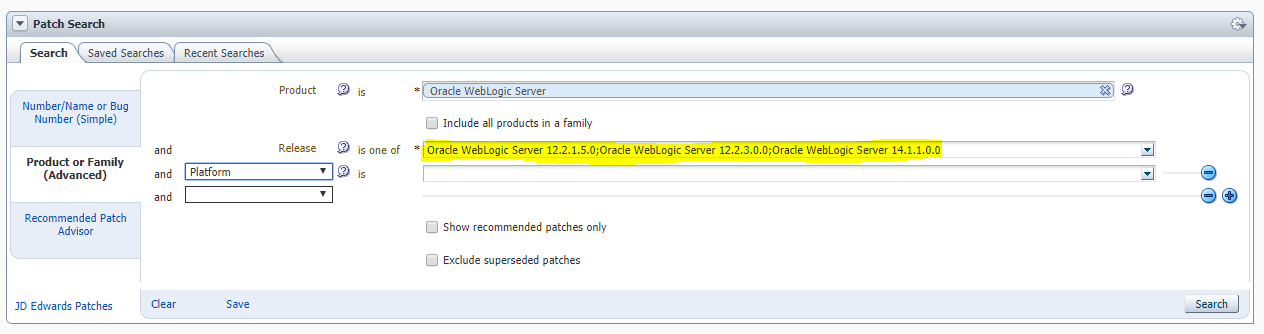
Today I was checking as usual the available patches for Oracle WebLogic Server and I discovered some new WebLogic Server Releases within the drop list of the available releases.


It seems that for the current supported WebLogic Server 12.2.1.x will be a future PatchSet 5 (12.2.1.5.0).

The given Release with 12.2.3.0.0, I personally doubt that this will come.

For the future WebLogic Server, which is currently in Beta Testing, it seems that Oracle will really name it 14.1.1.0.0. I have no clue why Oracle is choosing this naming convention for the new Oracle WebLogic Server Release, seems they want to be back to the good old days with various naming conventions between Oracle DB, Oracle Enterprise Manager and Oracle Fusion Middleware products.

Monday, November 18, 2019

Deprecated Functionality for WebLogic Server 12.2.1.4.0

Since around 6 weeks the last Oracle WebLogic Server 12.2.1.4.0 Release is available and I got some spare time to read the necessary documentations.

In the "What's new Guide" https://docs.oracle.com/en/middleware/fusion-middleware/weblogic-server/12.2.1.4/notes/whatsnew.html I found 2 interesting deprecated features, which weren't announced somewhere else.

Meaning of deprecated features (source MOS Note 888028.1)

Oracle Fusion Middleware deprecation process is to announce a feature deprecated in a given release where it will continue to be fully supported for bug fixes until the next major release. In the next major release, the feature will then be removed. In some cases it may remain, but only to extend the transition period where error correction support is no longer expected.

Oracle Traffic Director is in deprecated status for Oracle WebLogic Server 12.2.1.4.0 https://docs.oracle.com/en/middleware/fusion-middleware/weblogic-server/12.2.1.4/notes/whatsnew.html#GUID-362AA8C0-082A-4744-B7F2-2BD4E0194F30. Oracle recommends as alternatives the usage of the Oracle HTTP Server, Microsoft IIS, Apache HTTPD Server with the corresponding Server Plugins and so on.

The second interesting feature which is in deprecated status for Oracle WebLogic Server 12.2.1.4.0 is the WebLogic Multitenant feature and the Resource Consumption Management https://docs.oracle.com/en/middleware/fusion-middleware/weblogic-server/12.2.1.4/notes/whatsnew.html#GUID-B95FF848-893D-44A7-925E-1F87279F6CAE. As an alternative Oracle mentions the usage of Container-Based Solutions.


Thursday, October 10, 2019

OGB Appreciation Day: What I appreciate and what I would like to appreciate

It's time again for the OGB Appreciation Day #ThanksOGB (formerly known as #ThanksOTN and #ThanksODC) initiated by Tim Hall https://twitter.com/OracleBase

At first, what I appreciate from Oracle:

WOW, We have a new Fusion Middleware Release 12.2.1.4.0 :-) after nearly waiting for 2 years ! 
As my main focus is on WebLogic and Oracle Forms & Reports, I already had a closer look on this stuff and I must say, that specially for Oracle Forms & Reports, Oracle integrated some cool features/enhancements.

The browser-less solution for running Oracle Forms & Reports with the Forms Standalone Launcher is getting more and more mature, specially now with the ability to use SSO from Forms Standalone Launcher.

I really must admit that the Forms Standalone Launcher is the best improvement for Oracle Forms & Reports so far, as we can get rid of the Java Plugin dependencies within the Browsers.

On top with the latest Release 12.2.1.4.0 for Oracle Forms & Reports it's for me a clear commitment from Oracle for the future of Forms & Reports (here my special thanks goes to Michael Ferrante - Product Manager Forms & Reports https://twitter.com/OracleFormsPM )

The next thing, what I personally appreciate is the Always Free Cloud offering from Oracle.
It's really a great offering to give everybody for free and always 2 Oracle Databases (even when they are limited in terms of Memory and Space) and on top a Linux Server with 100 GB Storage with root privileges.
Now everybody can test and play from everywhere and every time (only an Internet Connection is required) with an Oracle environment. The cool thing is even, that you have a web-based SQL Developer and APEX.


As second, what I would like to appreciate from Oracle:

This is a long on going topic in the Oracle Community, the quality of the Oracle Support.
Over the past years the quality of the Oracle Support were decreasing from year to year up to an unbearable level. 
You have to fight with Support-Bots (while I am writing this blog post, I have opened in parallel a SR with Oracle Support and ooooooh miracle I'm discussing my support case with a Support-Bot ... ) , your open Bugs are not being processed and partially you get complete wrong answers on your questions or even you ask something and there is no reply for 2 weeks.

Dear Oracle Support, I can understand, that you don't want to fix a bug (which is not mission critical) for a Database Release which will be out of support within the next 9 months, but then PLEASE tell us, that you don't want to fix it and it will be fixed within the next upcoming release. In this case, I would know what to expect and not to let stay open my bugs and post only the famous mystery lines:
*** 11/19/18 10:03 am ***
*** 11/20/18 12:16 am ***
*** 11/29/18 12:00 am ***
*** 12/28/18 04:14 am ***
*** 01/31/19 12:34 am ***
*** 04/04/19 04:16 am ***
*** 07/29/19 08:12 am ***
*** 10/08/19 09:08 am ***

The next thing what I would like appreciate from Oracle is the version numbering concept for my beloved Oracle Fusion Middleware.
Currently we have for example Oracle WebLogic Server 12c (12.2.1.x) Releases, so far so good. The Oracle Database Releases are now following the version numbering concept with the years, for example Oracle Database 18c (2018), Oracle Database 19c (2019). So far so good, but who came to the brilliant idea to plan an Oracle WebLogic Release 14?
Long time ago we had the same confusion with the different version numbering concept between Oracle Database and Oracle Middleware Products (like iAS, OAS and so on, the older folks will still remember this products), with Oracle Middleware 12c we were aligned, but now with a future Release 14 we are back to the old confusion.
Dear Oracle, please align the version numbering concept ...